
Optimizing a Google Business Profile for a real estate agent comes down to five things, in this order: being eligible for the profile you create (Google’s rules exclude lead generation agents, virtual offices and for-sale properties, and they are enforced by suspension), choosing between an agent profile and a brokerage profile without creating duplicates, setting the service area and address correctly, filling in categories, name, description, photos and services the way Google’s guidelines actually permit, and then running a monthly routine of reviews, posts and performance checks. Most agents skip the first three and go straight to photos and posts. That is why real estate is one of the industries where profiles get suspended most often, and why this guide starts where the risk is.
Everything attributed to Google below was read from Google’s own Business Profile help pages during the week this was written, with the wording quoted exactly, because most advice on this topic circulates second hand and a surprising amount of it is wrong. Where we give our own recommendations, we say so. This post covers the profile itself. For the wider map-pack strategy, including citations, location pages and local links, read our guide to local SEO for real estate agents, and for the website side of ranking in a neighborhood, our neighborhood page guide follows later this month.
How Google ranks the map pack, in Google’s words
Google’s help page on local ranking says “Local results are mainly based on relevance, distance, and popularity.” It defines the three plainly: “Relevance is how well a Business Profile matches what someone is searching for.” “Distance refers to how far each business is from the customer who’s searching.” “Prominence means how well-known a business is.” and “This factor’s also based on info like how many websites link to your business” (Google, Tips to improve your local ranking). Two more lines from the same page settle a lot of arguments: “Businesses with complete and accurate info are more likely to show up in local search results.” and “There’s no way to request or pay for a better local ranking on Google.”
For an agent, that translates into three jobs. Relevance is your categories, your name as it really is, your description and services. Distance you cannot change, which is why the service area and address decisions below matter more than any photo. Prominence is reviews plus the authority of your website and the pages that mention you, which is where the profile stops and SEO proper begins.
Eligibility first: who in real estate is allowed a profile
Google’s eligibility page sets the base rule: “To qualify for a Business Profile, a business must make in-person contact with customers during its stated hours.” (Google, Business eligibility and ownership guidelines). Real estate agents pass that test as a class. The representation guidelines name them directly: “Doctors, dentists, lawyers, financial planners, and insurance or real estate agents are all individual practitioners.” and “An individual practitioner is a public-facing professional, typically with their own customer base.” (Google, Guidelines for representing your business on Google).
The exclusions are where real estate gets caught. The same guidelines state that “Sales associates or lead generation agents for corporations aren’t individual practitioners” and “aren’t eligible for a Business Profile.” The eligibility page lists “Lead generation agents or companies.” among ineligible businesses, and, in the line that matters most for developers and new-construction teams, it lists “Rental or for-sale properties such as vacation homes, model homes, or vacant apartments.” as ineligible while adding “Sales or leasing offices, however, are eligible for verification.” So a model home is not a business, but the staffed sales office next to it is. A listing is never a business. An ISA who sets appointments for a team is not a practitioner.
Location rules remove two more common setups. On virtual offices: “If your business rents a physical mailing address but doesn’t operate out of that location, also known as a virtual office” then “that location isn’t eligible for a Business Profile.” On shared space: “Businesses can’t list an office at a co-working space unless that office maintains clear signage” and it “receives customers at the location during business hours, and is staffed during business hours by your business staff.” The guidelines also say “Businesses showing their address on Google should maintain permanent fixed signage of their business name at the address.” An agent who hangs a desk at an executive suite two days a month, or who uses a mail-drop address, does not have an eligible address. They may still have an eligible service-area profile, covered below.
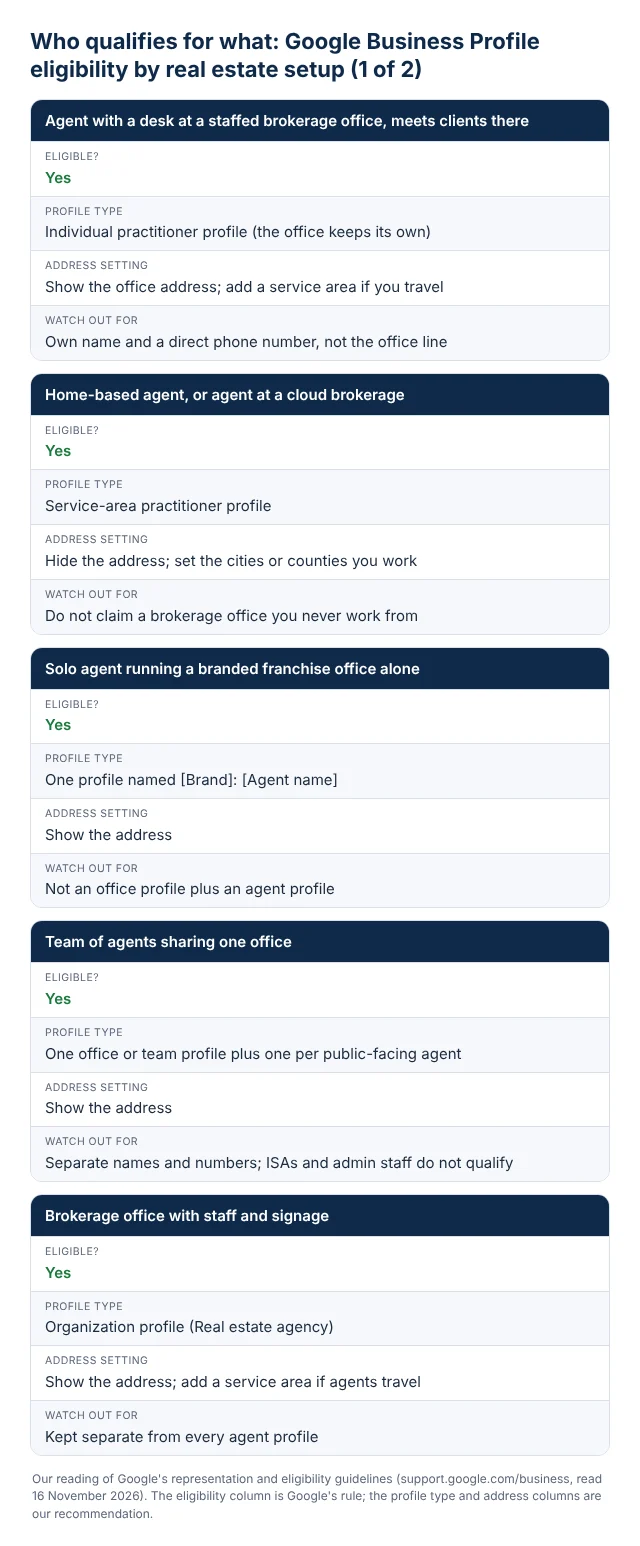
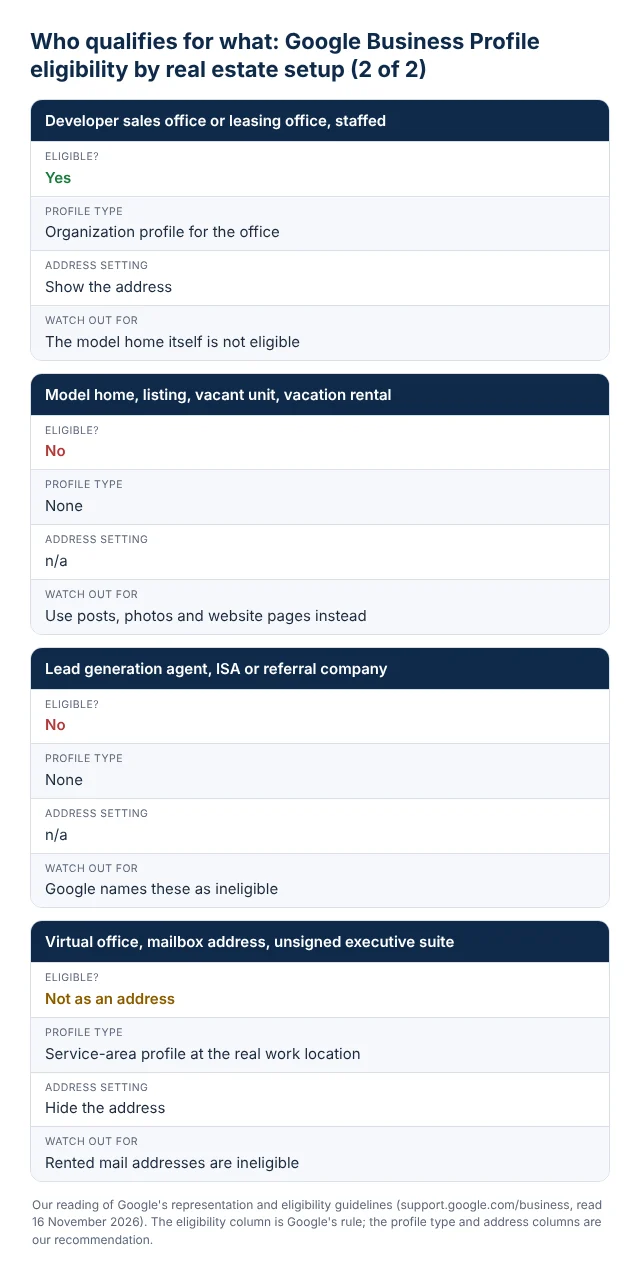
The table below is our reading of how those rules land on the setups we see most. It is analysis, not Google’s text, and the decision you make here is the one a reviewer will test if your profile is ever suspended.
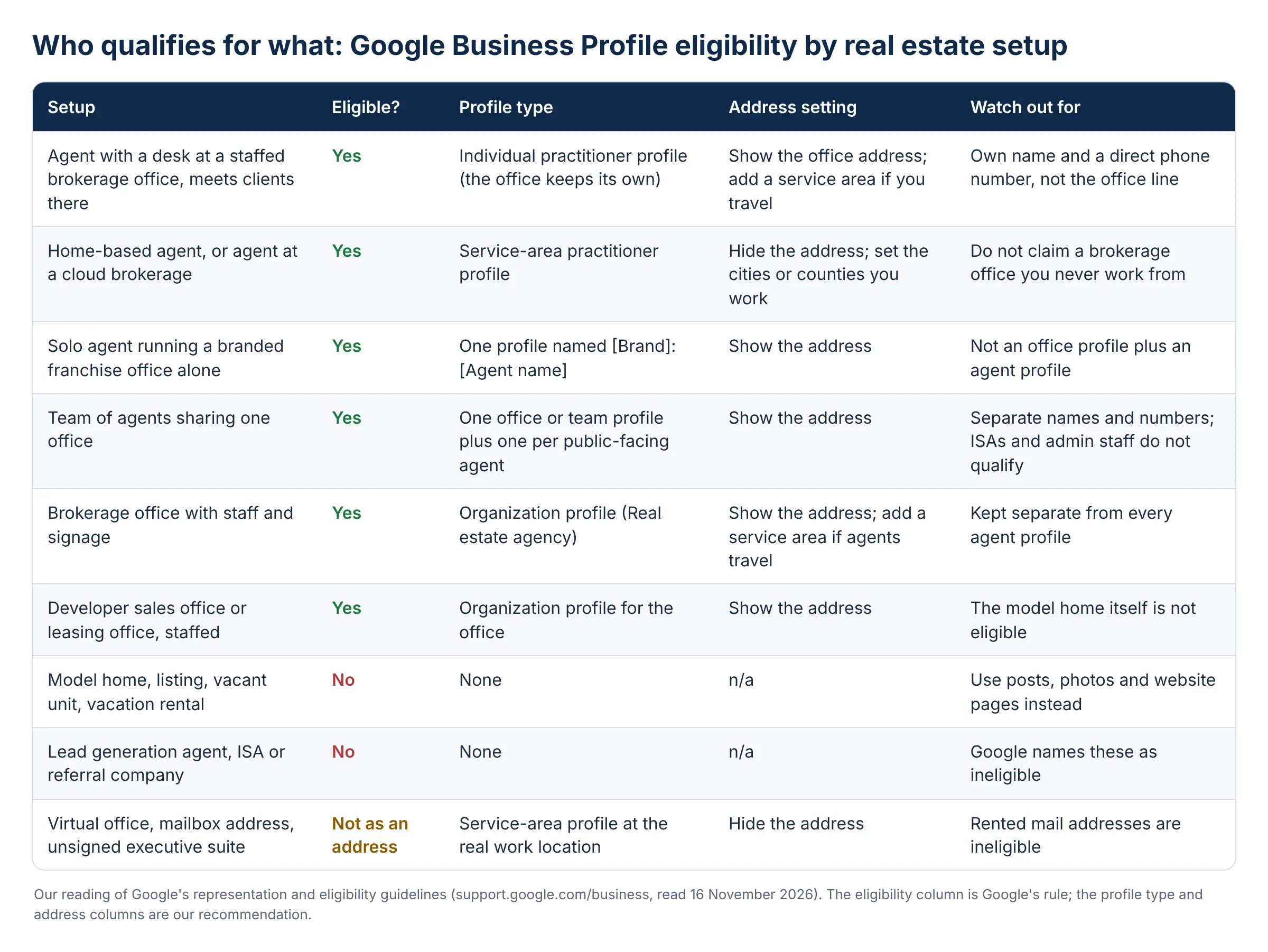
One live caution, reported rather than documented. In May 2026 Sterling Sky published cases of agents at eXp Realty having profiles suspended, with a Google support reply quoted as saying “our guidelines currently restrict us from working with cloud-based brokerage models” (Sterling Sky, 29 May 2026). That is one support agent’s wording, not a published policy, and the author disputes it. Our advice is practical: if your brokerage has no staffed office you work from, do not claim its address. Set yourself up as a service-area practitioner at the address where you actually work, and hide it.
Agent profile or brokerage profile, and how duplicates happen
Google allows both, under conditions. The practitioner rule: “An individual practitioner should create their own dedicated Business Profile if:” “They operate in a public-facing role. Support staff should not create their own Business Profiles.” and “They can be contacted directly at the verified location during stated hours.” The office rule, when several agents share a location: “The organization should create a Business Profile for this location, separate from that of the practitioner.” So a brokerage with twelve agents in one office can legitimately have thirteen profiles at that address: one for the brokerage and one per public-facing agent. Each agent profile needs its own name and ideally its own direct phone number, because the guidelines ask you to “Provide a phone number that connects to your individual business location” and say “The phone number must be under the direct control of the business.”
The one-person exception trips up solo agents at franchised brands. “If a practitioner is the only public-facing practitioner at a location and represents a branded organization” then Google’s instruction is to “Create a single Business Profile, named using the following format: [brand/company]: [practitioner name].” Its example is “Allstate: Joe Miller”. For a solo agent running a Keller Williams or RE/MAX branded office alone, that means one profile, not an office profile plus an agent profile.
Duplicates come from three habits. Agents who change brokerages create a fresh profile at the new office instead of editing the old one, leaving the old one live with the old phone number. Teams create a team profile and then every team member creates a personal profile at the same address with the same team phone number, which reads to Google as one business with six listings. And agents who work several towns create a profile per town to “rank there”, which fails the staffed-location test everywhere except where they actually sit. Google’s rule is blunt: “Do not create more than one page for each location of your business, either in a single account or multiple accounts.” and “A practitioner shouldn’t have multiple Business Profiles to cover all of their specializations.” Our rule of thumb: one profile per human who meets clients, one per staffed office, nothing per town, listing or specialty.
Service-area setup and when to hide your address
A service-area business, in Google’s definition, is one that serves customers at their locations rather than at its own. The guidelines put it this way: “If your business doesn’t have a storefront with clear signage but travels to customers at their physical locations” then “you’re allowed one service-area Business Profile.” And then the instruction that most home-based agents miss: “If you’re a service-area business, you should hide your business address from customers.” The illustration Google uses is a plumber working from home who should clear the address from the profile. A home-based agent is in the same position.
Hybrid setups exist. “If you serve customers at your address and want to set a service area, your business location should be staffed by your team” and “able to receive customers during its stated hours.” That describes a brokerage office that also sends agents out to showings: show the address and add a service area. Our recommendation for the service area itself is to list the cities or counties you actually take clients in, not every town within an hour’s drive. Distance is a ranking factor you do not control, and a service area is a declaration, not a ranking boost. A profile that claims a whole metro area does not rank across it; it mostly ranks near the hidden address, and overclaiming invites a review.
On hours, note a line that many agents violate by accident: “Certain types of businesses shouldn’t provide hours, including those with varied hours” and “those that operate only by appointment.” If you only meet clients by appointment, leave hours off rather than inventing nine to five.
Primary and secondary categories
Google’s guidance on categories is short: “Use as few categories as possible to describe your overall core business from the provided list.” “Choose categories that are as specific as possible, but representative of your main business.” and “The goal is to describe your business holistically”. The category list is Google’s, you cannot invent one, and the first category you pick is the one that carries the most weight in matching searches.
Our recommendations, as practitioners rather than as Google’s text. For an individual agent, the primary category should be “Real estate agent”. For a brokerage or team office, “Real estate agency”. Do not pick “Real estate agency” for a person; it describes an organization and it competes against brokerages for a different search. Secondary categories should only be added where you do that work as a real line of business: “Real estate consultant” for advisory work, “Commercial real estate agency” for an office with a commercial division, “Property management company” only if you manage properties, “Real estate appraiser” only if you are licensed to appraise. Every extra category dilutes the signal of the primary one and, if it describes a service you do not provide, gives a reviewer a reason to act. Three categories is usually the ceiling for an agent, and one is often right.
The name field: what counts as keyword stuffing
Keyword stuffing in a Business Profile name means adding words to the name that are not part of how the business is known in the real world. Google’s rule: “Your name should reflect your business’s real-world name” and “Including unnecessary information in your business name isn’t permitted”. The list of what is not allowed includes marketing taglines, store codes, service or product information, location information, business hours, phone numbers or URLs, and special characters.
Applied to real estate, that rules out “Jane Rivera | Austin Homes For Sale | Top Realtor” and “Rivera Group Real Estate Agent Round Rock TX”. The city is location information. “Homes for sale” is service information. “Top” is a tagline. Our reading of what passes: the name exactly as it appears on your signage, business card and brokerage roster. “Jane Rivera, Realtor” is defensible when that is how you present yourself everywhere, and the brokerage name belongs in the name only in the sole-practitioner case above. The test a reviewer applies is whether a person standing at your office, or looking at your card, would see that exact name. Keyword names do sometimes rank for a while. They also sit at the top of the list of things competitors report, and a suspension costs you every review you have collected while the profile is down.
Filling the profile: description, website, photos, services and products
Description and website
Google asks you to “Use the business description field to provide useful information on services and products offered” and prohibits descriptions that “Focus on special promotions, prices, and offer sales.” It adds “No links of any type are allowed.” Write the description the way you would answer a buyer who asks what you do: the areas you work, the price bands and property types you handle most, how long you have been licensed, and the brokerage you are with. Leave out the awards paragraph. For the website field, Google asks you to “Provide a website that represents your individual business location.” For an agent, that is your own site or your agent page, not the brokerage home page, and it is worth adding UTM parameters to the URL so the clicks are visible in analytics as coming from the profile.
Photos and video
Google’s published specifications are specific and worth following exactly. Photos: “Format: JPG or PNG.” “Size: Between 10 KB and 5 MB.” “Recommended resolution: 720 px tall, 720 px wide.” “Minimum resolution: 250 px tall, 250 px wide.” Video: “Duration: Up to 30 seconds long”, “File size: Up to 75 MB”, “Resolution: 720p or higher” (Google, Manage your Business Profile photos and videos). The slots are a logo, a cover photo and general business photos, and Google notes that “The photo should be in focus and well lit, and have no significant alterations or excessive use of filters.”
What to upload, from our side: a current headshot as the logo for an agent profile (the brokerage logo for an office profile), a cover photo of you or your team in the market rather than a stock skyline, the office exterior and interior if you show an address, and a rotating set of photos from closings, open houses and the neighborhoods you work. Listing photos are fine as a small share; a profile that is nothing but listing photos looks like a listing, and listings are not eligible businesses. Geotagging image files does nothing, despite what several guides still claim, and renaming files is harmless but not a ranking lever.
Services and products
The services section lets you list what you do under each category, with a short description per service. For an agent, that is buyer representation, seller representation, relocation, first-time buyer guidance, investment property, and anything you truly specialize in, each with two or three plain sentences. Products are a merchandising feature built for retailers, but agents use them for packaged offers: a free home valuation, a seller consultation, a buyer strategy session. A product needs a name, a category, a description and ideally a photo and a link to the page where someone takes the next step. Do not list individual homes as products. Both sections are a relevance signal and a conversion surface, and both should be reviewed twice a year because stale offers look like a dead profile.
Posts, Q&A, chat and bookings as currently documented
Google’s post types are “Updates: Share info about your business.” “Offers: Provide promotional sales or offers from your business.” and “Events: Promote an event at your business.” Posts can hold text, photos or video, and “Posts older than 6 months are archived unless a date range is set.” (Google, Create and manage posts on your Business Profile). Posts go through review and can sit at “Pending” or come back “Not approved”, which happens most often when a post includes a phone number or reads like a listing advertisement. Our cadence recommendation is two posts a month that a client would find useful: a just-sold with the lesson from the sale, a market note for one neighborhood, an open house as an event. Posts are not a ranking factor in any way Google has documented. They are a freshness and conversion signal for the people already looking at you.
Questions and answers is the public section where anyone can ask about your business and anyone can answer. In practice the owner can and should ask and answer the questions clients ask every week: do you work with first-time buyers, what areas do you cover, do you charge a buyer fee, do you handle rentals. Answer from the owner account so the response is marked as from the business, and check the section monthly, because a stranger’s wrong answer stays visible until you correct it.
Chat changed. The native Google chat that many older guides tell you to enable is no longer what Google documents; the current help page describes a different feature: “Businesses with a claimed and verified Business Profile can add a WhatsApp or text messaging option” with the caveat that “Chat options are currently available for select regions and might not be available for your Business Profile.” You add it under Edit profile, then Contact, then Chat, and “If you add both options, only the text message option will be shown to customers.” (Google, Chat with customers from your Business Profile). For a US agent, the text message option pointing at your mobile number is the sensible choice. Bookings work through a third-party provider or your own link: “Your booking providers will show up on your Business Profile within a week.” and “You can also add your own link to your Business Profile.” (Google, Set up bookings through a provider). A link to your consultation scheduler is the simplest version and converts well for seller consultations.
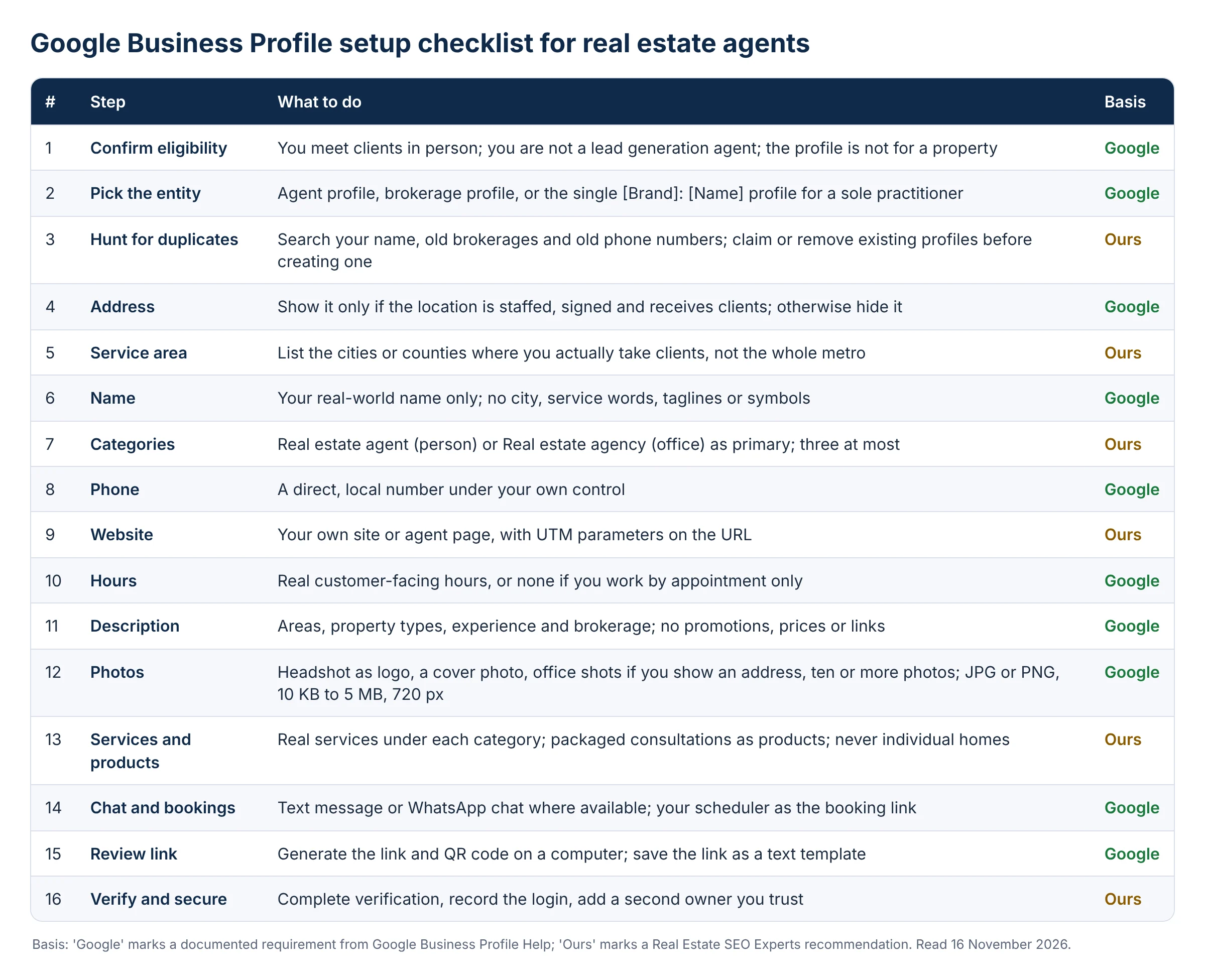
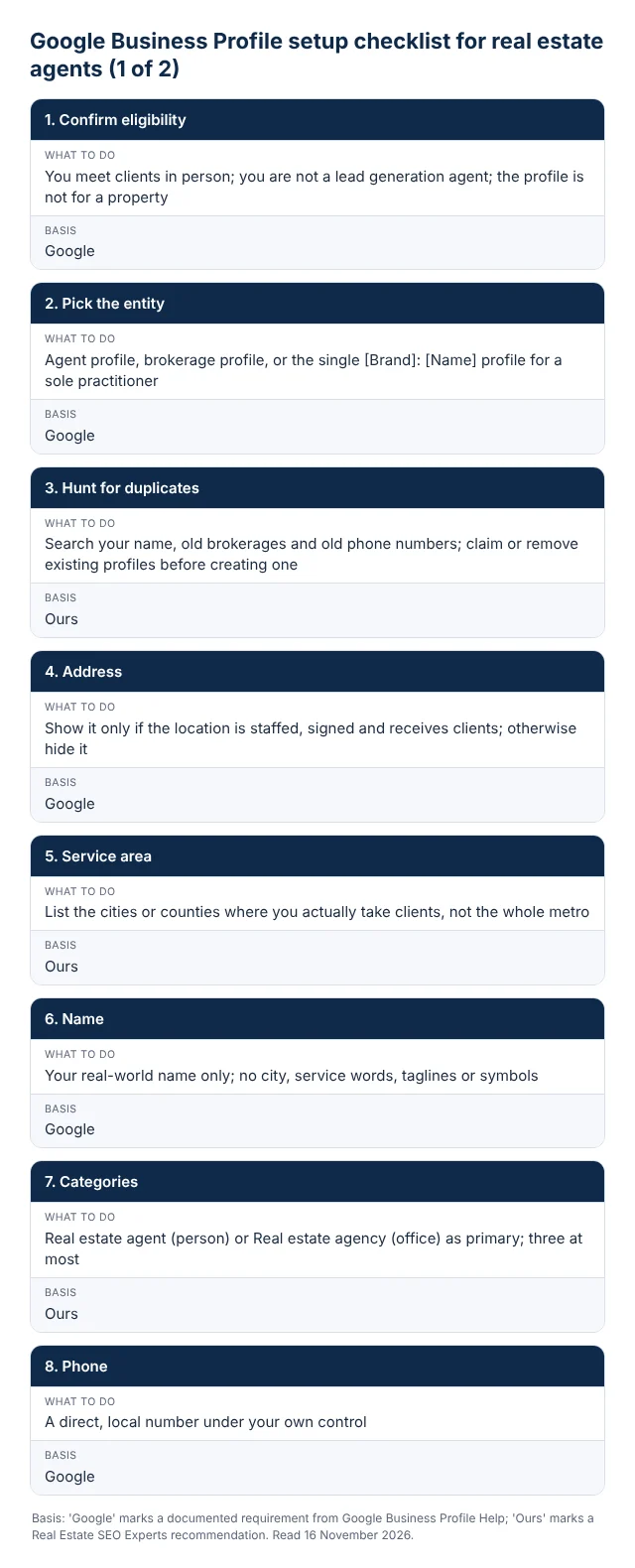
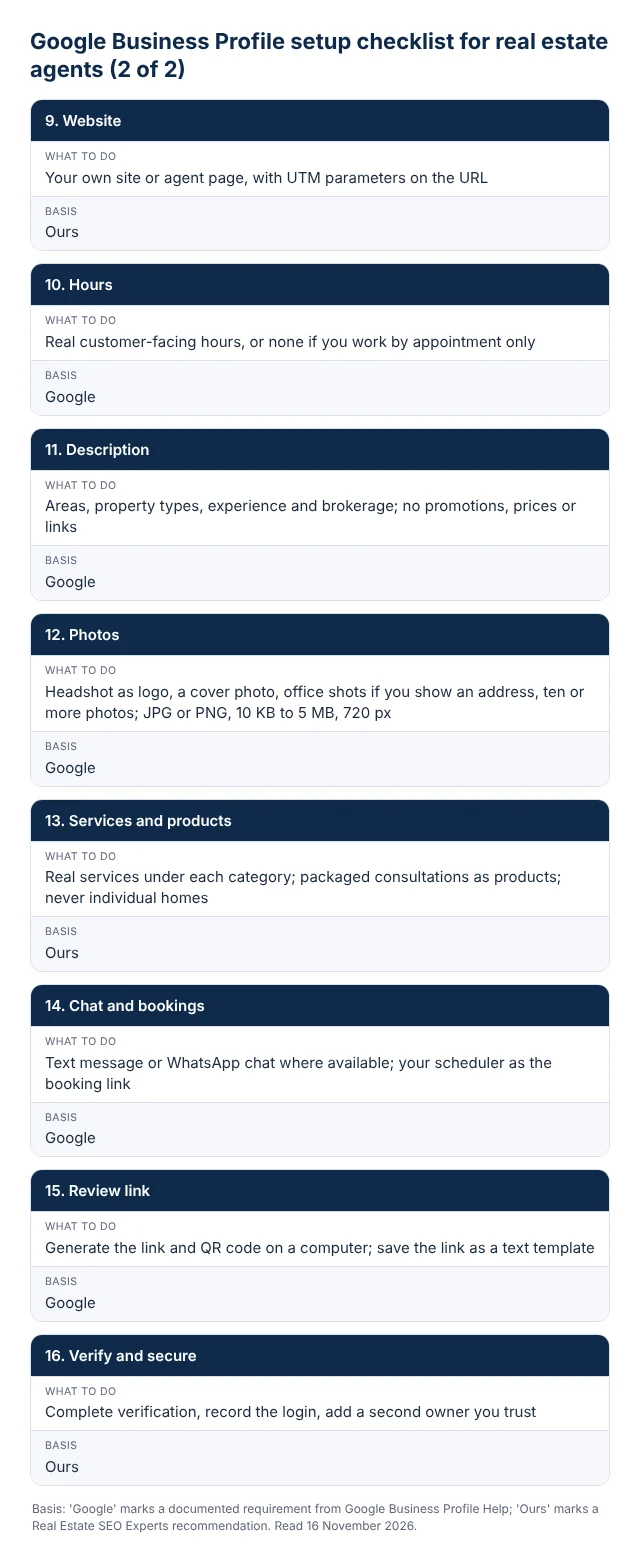
Here is the whole setup, in order, as a checklist. Items marked Google are documented requirements; items marked Ours are our recommendations.
Reviews: how to ask, how to reply, and what gets a profile restricted
Google gives you a review link and a QR code for asking: “you can create and share a link or QR code to request reviews”, found under Read Reviews, then Get more reviews, and “Currently, reviews QR codes can only be generated on a computer browser, not on mobile devices.” (Google, Create a Google link or QR code to request reviews). Google also reminds you that “Customers must be signed into a Google Account to leave a review.” (Google, Tips to get more reviews), which is why review requests sent by text with the direct link outperform a verbal ask at closing.
The policy lines agents break most often are in the Maps content policy (Google, Prohibited and restricted content). Businesses may not offer incentives such as payment, discounts or free goods “in exchange for posting any review”. They may not “Discourage or prohibit negative reviews, or selectively solicit positive reviews from customers”, which is what review-gating software does when it only sends happy clients to Google. “merchants should not require or pressure users to leave ratings or write reviews while on the premises”. And content “based on a conflict of interest” is prohibited, where “A conflict of interest may include current or former employment”: your transaction coordinator, your team members and agents on the other side of your deals should not be reviewing you, and you should not be reviewing them. Reviews “that have been paid for, directly or in kind” are fake engagement and get removed.
The penalty has teeth now. Google’s policy on restrictions says that where it finds fake or incentivized reviews, “we might place restrictions on their Business Profile (in addition to removing the violative reviews)”, including that the “Business Profile will not be able to receive new reviews or ratings for set period of time”, and “We will notify business owners via email if we plan to apply a restriction to their profile.” (Google, Business Profile restrictions for policy violations). A review freeze during your spring listing season is a real cost.
A clean process, which is ours: ask every client at the moment of handover, by text, with the direct link, with no filter on who gets asked. Reply to every review within a week. For positive ones, name something specific about the transaction without disclosing the address or price. For negative ones, state the facts briefly, offer to continue offline, and never argue; the reply is written for the next reader, not the reviewer. Report reviews that break policy through the profile, and expect that a review from an unhappy buyer who lost a bidding war is allowed to stay. Reviews on the profile also feed Google’s ranking: “More reviews and positive ratings can help your business’s local ranking.” is Google’s own line, with no number attached, and we do not have one either.
Suspensions and reinstatement
A suspended Business Profile is one Google has removed from Search and Maps for a guidelines violation; in practice a hard suspension takes the listing and its reviews out of public view until it is reinstated. Google’s page says “We may suspend or disable Business Profiles that don’t follow our guidelines.” and “If you believe your profile should be reinstated, you can submit an appeal.” (Google, Fix suspended or disabled profiles). Two rules shape the whole process. “Appeals can only be submitted once.” and “Do not create a new Business Profile for the same business.” A second profile created during a suspension is the fastest way to turn a fixable problem into a permanent one.
Before appealing, fix the profile. In our experience the real estate triggers are, in order of frequency: a home address shown on a profile that should be service-area, a brokerage address claimed by an agent who has no desk there, a name with city or service words in it, a second profile at the same office with the same phone number, and a category list that includes services the agent does not offer. Correct every one of these first, because the appeal is judged on the profile as it stands. Then gather what Google says will help: “Evidence that can help strengthen your appeal includes:” official business registration, a business license, tax certificates and utility bills for the business, and “check that the business name and address match the profile you want to make an appeal for.” For an agent, the state license showing your name, the brokerage affiliation letter and a utility bill at the address you are verifying are the documents that work. Google does not publish a turnaround time. If the appeal is refused, “Only if your reinstatement request is denied, we may be able to do an additional review”, which in practice means a second look, not a second appeal.
What to track, and how to pull it
Business Profile performance is Google’s own reporting on how people found and used your profile, and it is only available for verified profiles: “Performance data is available only for verified Business Profiles.” The metrics, in Google’s definitions: “Interactions: A summary of all your total interactions.” “Searches: The search terms people used to find your business.” “Views: How many people viewed your Business Profile on Search and Maps.” “Directions: How many people asked for directions to your business.” “Calls: The number of times a customer clicked on the call button on your Business Profile.” “Website clicks: The number of times people clicked on the website link on your Business Profile.” “Messages: The number of different conversations through messages.” and “Bookings: The number of bookings people completed.” (Google, Understand your Business Profile performance and insights). One timing note from the same page: “The searches metric is updated at the start of each month. It might take up to 5 days to show up.”
To pull the data, search your business name while signed in and open Performance, choose a period and apply; or, on a computer, open Business Profile Manager, select the profile, then Actions and Insights, and download the report for the timeframe. What we watch for agents, month to month: calls and website clicks as the two outcome metrics, the ratio of branded searches (your name) to unbranded searches (“realtor near me”, “real estate agent [city]”) as the signal of whether the profile is winning new people or only serving people who already know you, and direction requests only if you show an address. Pair the website clicks with the UTM-tagged URL in analytics so you can see what those visitors did. Keep a simple spreadsheet; the monthly download is the only history you will have, because the searches figure is replaced each month.
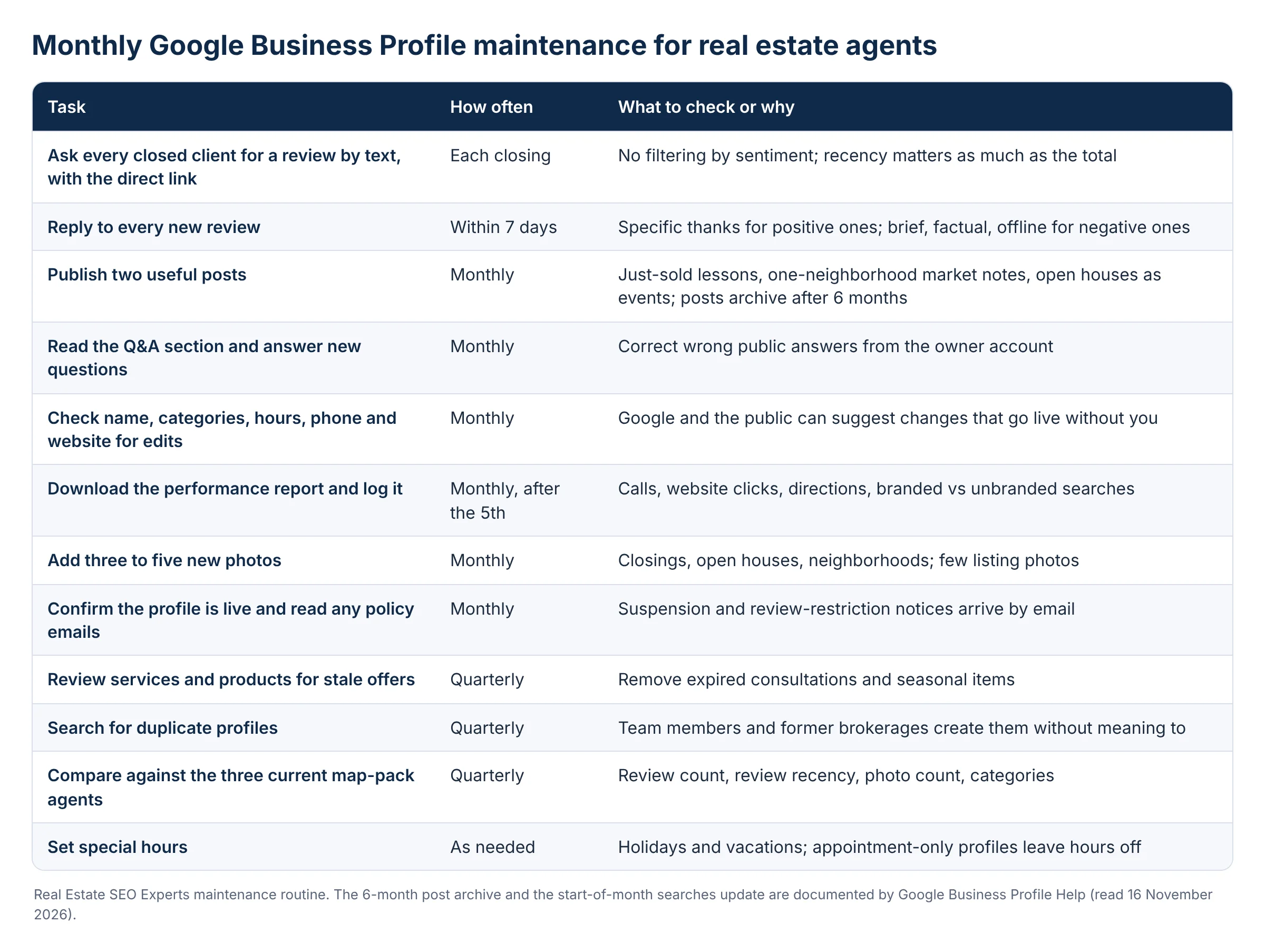
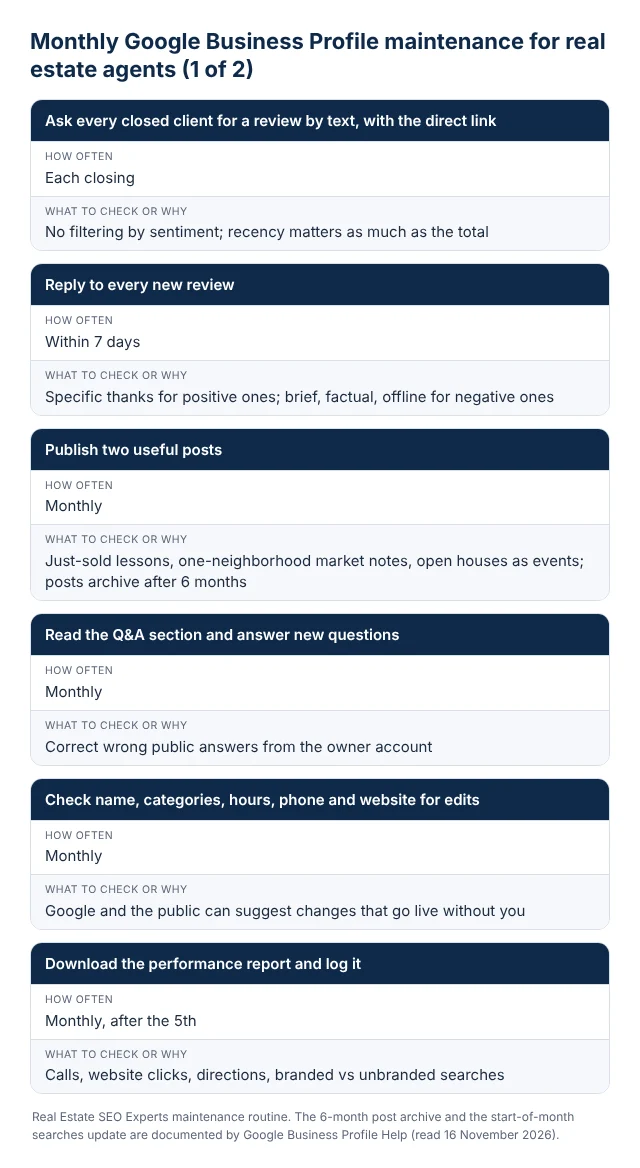
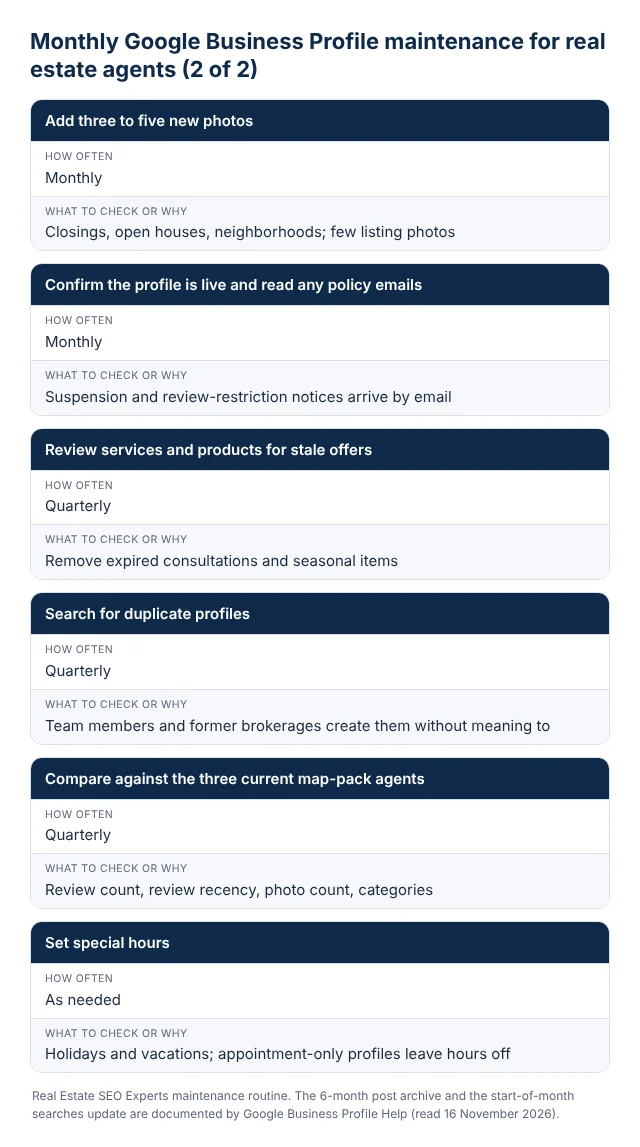
The maintenance routine below is the one we run for clients on our real estate local SEO plans. It takes about an hour a month once the setup is right.
Where the profile ends and your website begins
A well-run profile wins the searches where someone wants an agent near them. It does not win “homes for sale in [neighborhood]” or “[city] real estate market”, because those are website searches, and the profile’s own prominence depends partly on how many sites link to and mention your business. That is why the profile is check seven of twelve in the audit we run before taking on a client, not check one. The website work that feeds the profile (consistent name, address and phone across your site and the portals, an about page that says who you are and where you work, neighborhood pages written from real experience) is covered in our 44-point real estate SEO checklist, and the IDX problems that stop most agent sites from carrying any authority at all are in our IDX website SEO guide.
If you want a second pair of eyes on the eligibility and duplicate questions before you touch anything, our free real estate SEO audit includes the profile check described above, and our Realtor SEO agency page explains how we handle the profile alongside the website for individual agents and teams.
Frequently asked questions
Can a real estate agent who works from home have a Google Business Profile?
Yes, as a service-area business. Google names real estate agents as individual practitioners and allows one service-area profile for a business that travels to customers rather than receiving them. The condition is that you hide the address: Google’s guidelines say a service-area business “should hide your business address from customers.” Set the service area to the cities or counties where you actually take clients.
Should I use my brokerage’s office address on my profile?
Only if you can be met there. Google’s practitioner rule requires that you “can be contacted directly at the verified location during stated hours.” If you have a desk at a staffed brokerage office and meet clients there, use it; the brokerage keeps its own separate profile for the office. If the brokerage is cloud-based or you never go in, set up as a service-area practitioner at the address where you really work and hide that address.
Can I put “Realtor” or my city in my Google Business Profile name?
The city, no: location information is on Google’s list of what is not permitted in the name. “Realtor” is defensible when it is part of how you present yourself on signage and cards, as in “Jane Rivera, Realtor”, because the rule is that the name “should reflect your business’s real-world name”. Anything that reads as a service, a tagline or a place is keyword stuffing and is the most common reason a competitor’s report gets a profile edited or suspended.
Can I create a Google Business Profile for a listing or a model home?
No. Google’s eligibility guidelines list “Rental or for-sale properties such as vacation homes, model homes, or vacant apartments.” as ineligible. A staffed sales or leasing office is eligible: “Sales or leasing offices, however, are eligible for verification.” Developers should verify the sales office and use posts, photos and the website for the homes themselves.
How many Google reviews does a real estate agent need?
Google does not publish a number, and we do not invent one. Its ranking page says only that “More reviews and positive ratings can help your business’s local ranking.” The practical target is to have more recent reviews than the agents who currently hold the three map positions for “real estate agent” in your city, with new ones arriving every month. Recency matters as much as the total, because a profile whose last review is a year old reads as inactive. BrightLocal’s 2026 consumer survey found that 68% of consumers will only use a business rated four stars or higher and 74% look for reviews from the last three months; those and the other local search figures are in our real estate SEO statistics roundup.
Why was my real estate Google Business Profile suspended?
Google does not state the reason in the suspension notice, but in real estate the usual causes are an address that fails the staffed-location test (a shown home address, a virtual office, a brokerage office you do not work from), a keyword-stuffed name, duplicate profiles at one office sharing a phone number, or a profile created for a listing or lead generation operation. Fix the profile first, then appeal once with your license, brokerage letter and a utility bill, and do not create a replacement profile while you wait.
Sources: Google Business Profile Help, Guidelines for representing your business on Google, Google Business Profile Help, Business eligibility and ownership guidelines, Google Business Profile Help, Tips to improve your local ranking on Google, Google Business Profile Help, Manage your Business Profile photos and videos, Google Business Profile Help, Create and manage posts on your Business Profile, Google Business Profile Help, Chat with customers from your Business Profile, Google Business Profile Help, Set up bookings through a provider, Google Business Profile Help, Create a Google link or QR code to request reviews, Google Business Profile Help, Tips to get more reviews, Google Maps User Generated Content Policy, Prohibited and restricted content, Google Business Profile Help, Business Profile restrictions for policy violations, Google Business Profile Help, Fix suspended or disabled profiles, Google Business Profile Help, Understand your Business Profile performance and insights, Sterling Sky, Google is suspending eXp Realty agents (29 May 2026). All Google pages were read on 16 November 2026.
Want the profile and the website pulling in the same direction?
Our local SEO plans cover the Business Profile setup and monthly routine above, plus the citations, neighborhood pages and local links that give the profile its prominence. Plans start from $150 a month.