
Schema markup for a real estate website is a block of JSON-LD code that tells search engines and AI systems what a page is about: this is a brokerage at this address, this is an agent who works for it, this is a listing for a four-bedroom house offered at this price, this is an article by this author. The types that matter for real estate are RealEstateAgent (a LocalBusiness subtype) for the brokerage or agent business, Person for individual agents, RealEstateListing plus a residence type such as SingleFamilyResidence plus Offer for listing pages, BreadcrumbList on everything, and Article or BlogPosting on content. Of those, Google will visibly reward exactly three today: Local business markup (knowledge panel details), Breadcrumb (desktop only) and Article (title, image and date treatment). There is no Google rich result for a property listing, and the FAQ rich result stopped showing on 7 May 2026. Everything else you add is for machine understanding, which still matters, but you should know what you are buying before you spend a developer’s afternoon on it.
A note on sourcing. Every claim below about what Google supports links to a page on Google Search Central or schema.org that we fetched and read on 23 November 2026, and where we give an opinion we say so. We are a real estate SEO agency, and schema is a line item in our real estate website SEO service, so read the recommendations with that in mind.
What schema markup is, in two sentences
Structured data (schema markup) is a standardised vocabulary, maintained at schema.org, for labelling the entities and facts on a web page so that software can read them without guessing. Google reads it in three formats and recommends JSON-LD, a script block that sits in the page’s HTML and describes the page without touching the visible layout. The same page rules that Google applies to every site apply here: the markup must be “a true representation of the page content”, you must not “mark up content that is not visible to readers of the page”, and the data goes on the page it describes.
What Google actually shows for real estate markup today
The honest starting point is Google’s own structured data gallery, which lists the 25 features Google Search currently supports. Checked on 23 November 2026, the features a real estate site can realistically use are Local business, Breadcrumb, Article, Organization, Profile page, Review snippet (with a large caveat), Video and Image metadata. Product is on the list, but it is for merchant pages where a shopper can buy the item, which is not what a listing is. Vacation rental is on the list too, but Google’s vacation rental documentation says the instructions “are intended for sites that have already connected with a Google Technical Account Manager”, so it is a program for rental platforms, not something an agent can switch on.
Two things are missing from the gallery that older real estate guides still promise: FAQ and HowTo. Both are gone. The table below is our mapping of page type to schema type, with Google’s current treatment in the last column.
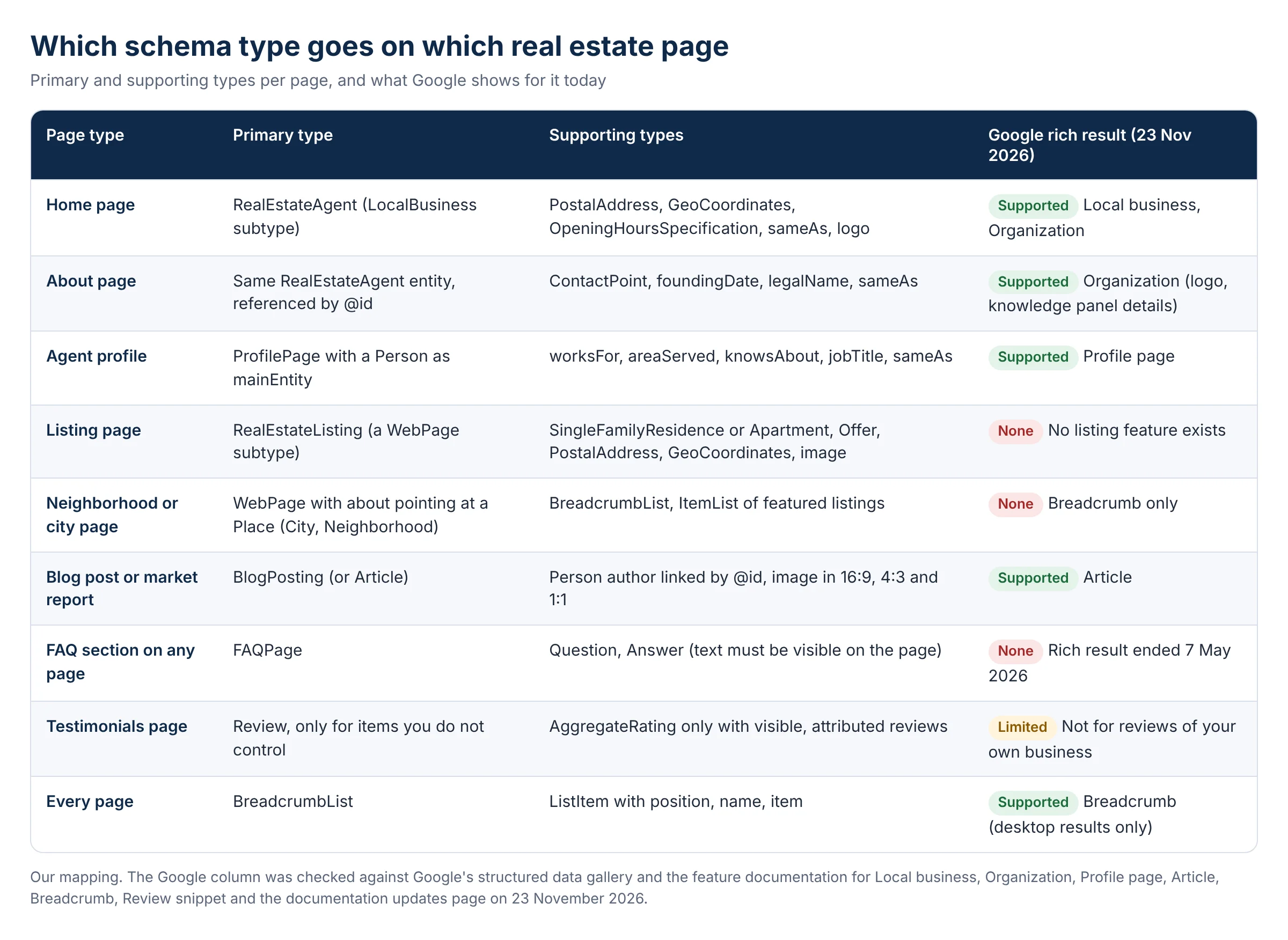
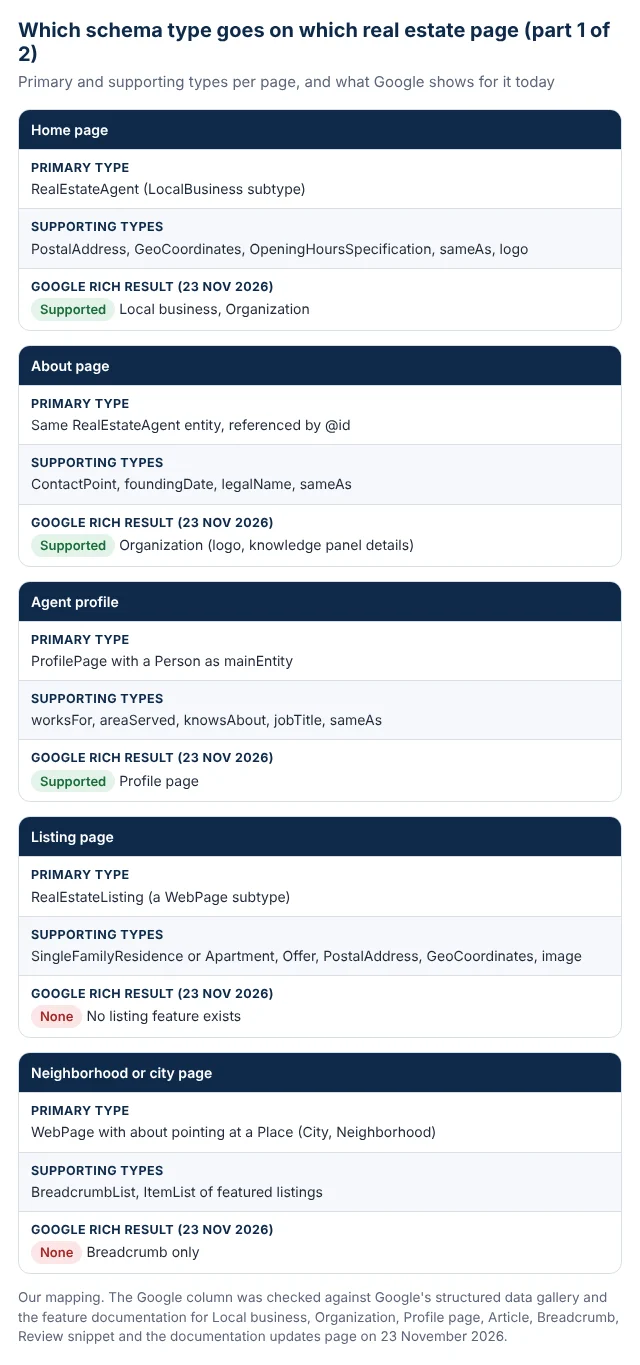
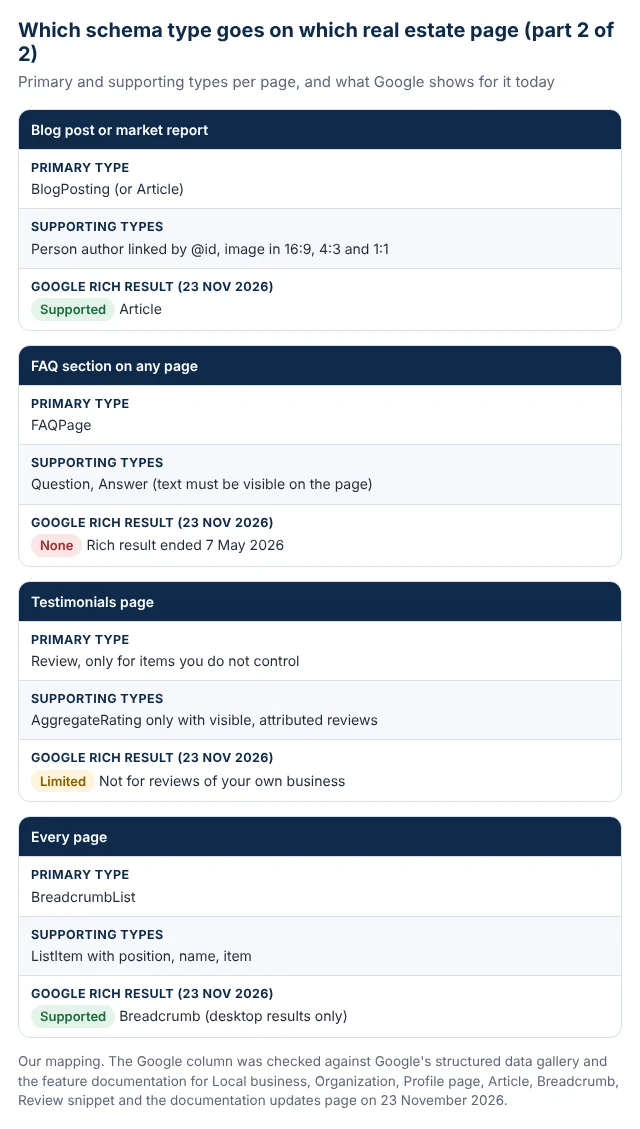
The gallery changes more often than most agencies notice. Google’s documentation updates page records the removals: practice problems in January 2026, course info, estimated salary, learning video, special announcement and vehicle listing in September 2025, and FAQ in May 2026. The lesson for a real estate site is that the markup you add should be justified by what it describes, not by a screenshot of a rich result from 2022.
The FAQ correction most guides have not made
FAQ rich results, the expandable question and answer rows under a search listing, no longer exist. Google’s updates page entry for 8 May 2026 reads: “Added a deprecation notice to the FAQ rich result documentation. This feature will no longer appear in Google Search starting May 7, 2026.” On 15 June 2026 Google removed the FAQ documentation entirely, noting that “the FAQ rich result feature is no longer shown in Google Search results”. The old documentation URL now redirects to the updates page, which is how we confirmed it.
That does not make FAQPage markup worthless. It is still valid schema.org vocabulary, and a question with a one-paragraph direct answer is the easiest format for an AI system to lift, quote and attribute. Our own view, which you should treat as opinion: keep writing real FAQs where readers have real questions, keep the FAQPage markup because it costs nothing and matches visible content, and stop adding it to pages that have no questions on them. The markup never earned a rich result for a list of invented questions, and now it earns nothing at all. (This article carries FAQPage markup for exactly that reason, and you can see what Google does with it: nothing visible.)
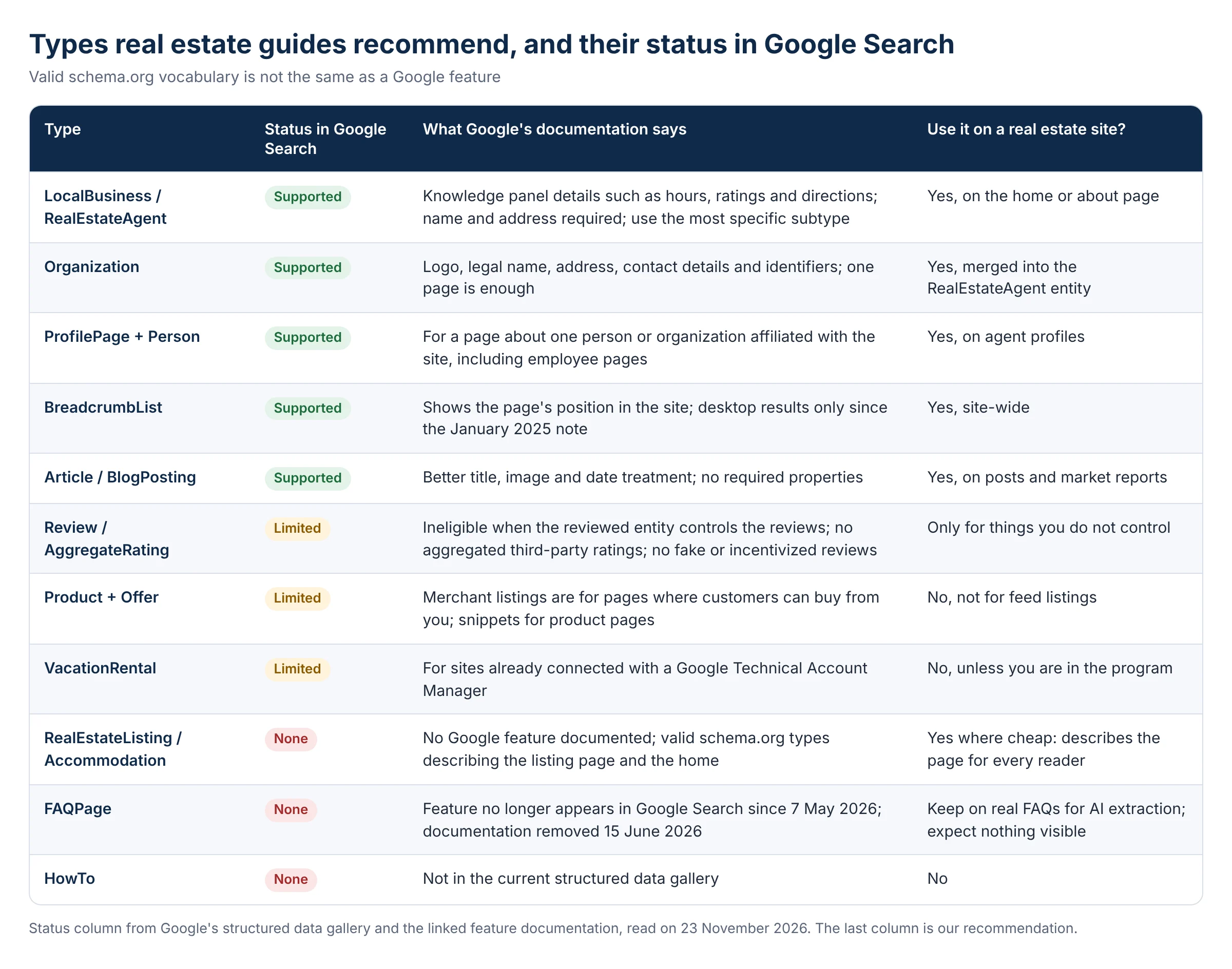
For completeness, here is where every type the older real estate guides recommend stands today.
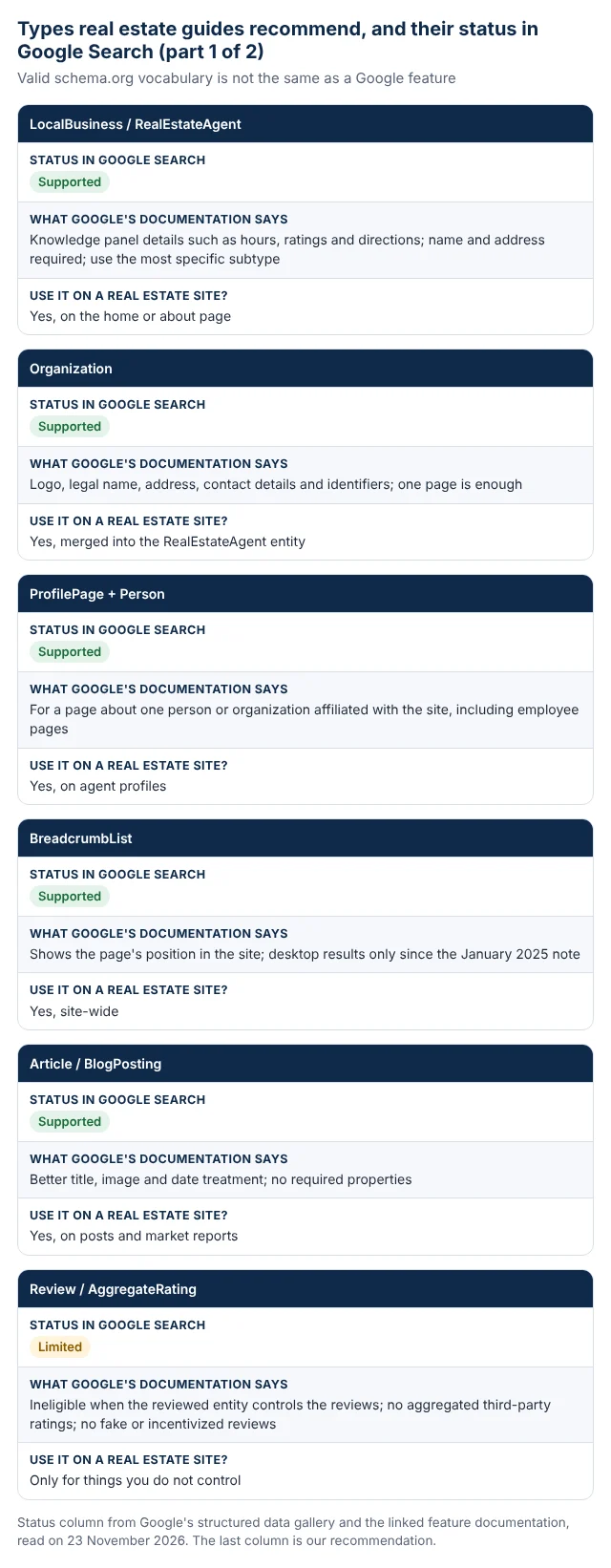
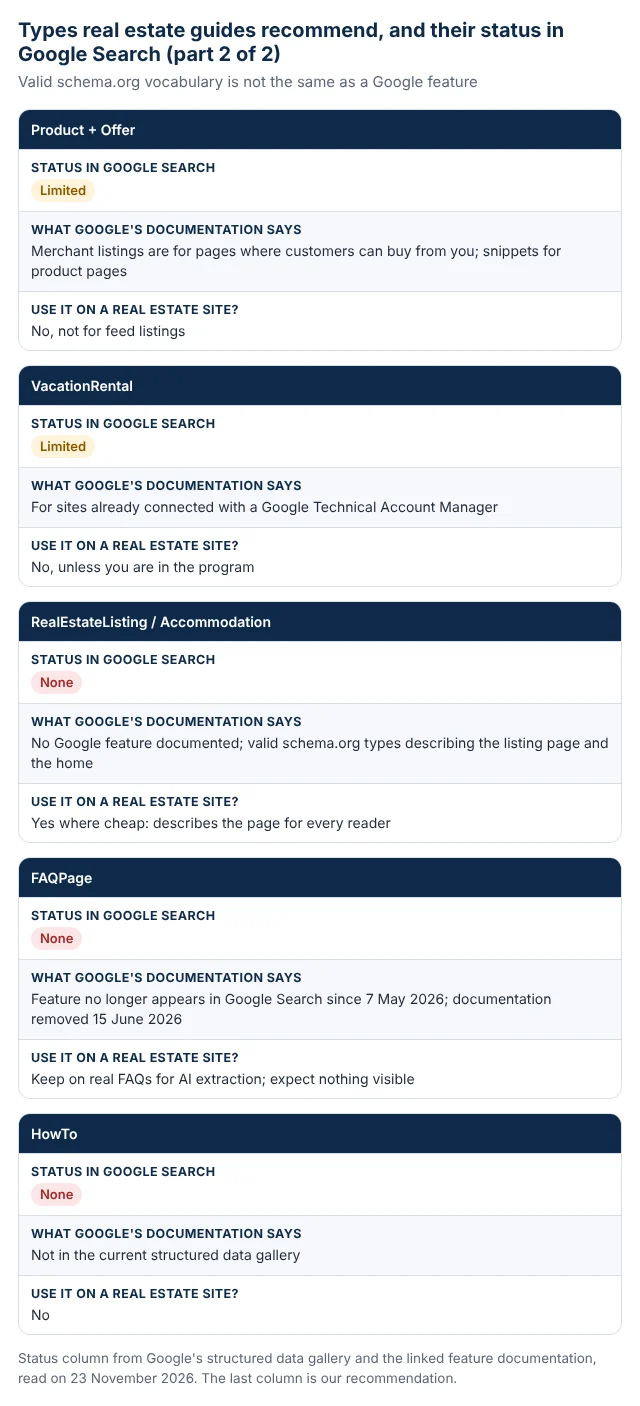
The business entity: RealEstateAgent, LocalBusiness or Organization?
Use RealEstateAgent. Schema.org defines it as a subtype of LocalBusiness, which in turn is a subtype of both Organization and Place, so one RealEstateAgent object carries everything an Organization or LocalBusiness object would, and Google’s local business documentation tells you to use the most specific LocalBusiness sub-type possible. The two required properties for Local business markup are name and address; the recommended ones that apply to a brokerage are geo (latitude and longitude with at least five decimal places), openingHoursSpecification, priceRange, telephone and url. Put this block on the home page or the about page, not on every page; Google’s Organization documentation says a single page that describes the organization is enough.
A common question is whether a solo agent is a RealEstateAgent or a Person. Both, on different pages. The business you trade as (even if it is just you with a license hung at a brokerage) is a RealEstateAgent on the home page. You as a human being are a Person on your profile page, with worksFor pointing at the brokerage. If you work under a brokerage that has its own website, your RealEstateAgent block names your team or practice and sameAs links to the brokerage’s page about you.
Reviews and ratings are where brokerage markup goes wrong most often. Google’s review snippet guidelines state that pages using LocalBusiness or Organization markup are ineligible for star display when “the entity that’s being reviewed controls the reviews about itself”. The local business page says the same from the other side: review and aggregateRating are recommended only for sites that capture reviews about other local businesses. So a brokerage adding its own five-star aggregateRating is not just wasted markup; it is a textbook self-serving review and a manual action risk. Leave rating properties off your own business entity and put the effort into your Google Business Profile reviews, which is where Google shows stars for a local business.
Agents as people: Person and ProfilePage
An agent profile page is the one place where Google has a feature specifically for a page about a single person. ProfilePage markup requires a mainEntity that is a Person (or Organization) with a name, and recommends description, image, sameAs, dateModified and identifier. Google’s stated scope includes “an employee page” and “a news site author page”, which is exactly what a brokerage’s agent page is. The Person inside it should carry jobTitle, worksFor, areaServed, telephone, knowsAbout and sameAs links to the agent’s Zillow, Realtor.com, LinkedIn and state license lookup profiles, because consistent identity across those sources is what lets Google and AI systems connect the dots.
Example 1 below is a full agent profile. Note that it does not claim any rating, and that every fact in it (license number, areas, phone) must appear in the visible page text.
{
  "@context": "https://schema.org",
  "@type": "ProfilePage",
  "@id": "https://www.example-realty.com/agents/maria-lopez/#profile",
  "url": "https://www.example-realty.com/agents/maria-lopez/",
  "dateModified": "2026-11-20",
  "mainEntity": {
    "@type": "Person",
    "@id": "https://www.example-realty.com/agents/maria-lopez/#person",
    "name": "Maria Lopez",
    "jobTitle": "Real estate agent (Texas license 0700000)",
    "description": "Buyer and seller agent covering Round Rock, Cedar Park and north Austin since 2014.",
    "image": "https://www.example-realty.com/wp-content/uploads/maria-lopez.jpg",
    "url": "https://www.example-realty.com/agents/maria-lopez/",
    "telephone": "+1-512-555-0142",
    "email": "maria@example-realty.com",
    "worksFor": {
      "@type": "RealEstateAgent",
      "@id": "https://www.example-realty.com/#brokerage",
      "name": "Example Realty Group"
    },
    "areaServed": [
      {
        "@type": "City",
        "name": "Round Rock"
      },
      {
        "@type": "City",
        "name": "Cedar Park"
      },
      {
        "@type": "City",
        "name": "Austin"
      }
    ],
    "knowsAbout": [
      "First-time buyers",
      "Relocation",
      "New construction"
    ],
    "sameAs": [
      "https://www.linkedin.com/in/example-maria-lopez/",
      "https://www.zillow.com/profile/example-maria-lopez/",
      "https://www.instagram.com/example.maria.lopez/"
    ]
  }
}
Addresses and places: PostalAddress, GeoCoordinates and Place
PostalAddress is the one property Google explicitly requires on a local business, and it is the one that is most often half-filled. Use streetAddress, addressLocality, addressRegion (the two-letter state code), postalCode and addressCountry (“US”), and make sure the string matches the address on your Google Business Profile character for character, including suite numbers. GeoCoordinates go in the geo property with latitude and longitude as numbers. Place and its subtypes (City, AdministrativeArea, Neighborhood) are most useful inside areaServed on the business entity and on neighborhood pages, where they tell a machine that the page is about a defined area rather than a listing. Do not expect areaServed to change where you rank in the map pack; proximity and the Business Profile do that, as our local SEO work for agents covers.
Example 2 is a brokerage block with the required and recommended local business properties and nothing speculative.
{
  "@context": "https://schema.org",
  "@type": "RealEstateAgent",
  "@id": "https://www.example-realty.com/#brokerage",
  "name": "Example Realty Group",
  "legalName": "Example Realty Group LLC",
  "url": "https://www.example-realty.com/",
  "logo": "https://www.example-realty.com/wp-content/uploads/logo-600.png",
  "image": "https://www.example-realty.com/wp-content/uploads/office-front.jpg",
  "description": "Independent residential brokerage serving Williamson and Travis counties, Texas.",
  "telephone": "+1-512-555-0100",
  "email": "hello@example-realty.com",
  "priceRange": "$$",
  "address": {
    "@type": "PostalAddress",
    "streetAddress": "1200 Main Street, Suite 210",
    "addressLocality": "Round Rock",
    "addressRegion": "TX",
    "postalCode": "78664",
    "addressCountry": "US"
  },
  "geo": {
    "@type": "GeoCoordinates",
    "latitude": 30.50826,
    "longitude": -97.67891
  },
  "openingHoursSpecification": [
    {
      "@type": "OpeningHoursSpecification",
      "dayOfWeek": [
        "Monday",
        "Tuesday",
        "Wednesday",
        "Thursday",
        "Friday"
      ],
      "opens": "09:00",
      "closes": "18:00"
    },
    {
      "@type": "OpeningHoursSpecification",
      "dayOfWeek": "Saturday",
      "opens": "10:00",
      "closes": "15:00"
    }
  ],
  "areaServed": [
    {
      "@type": "AdministrativeArea",
      "name": "Williamson County, TX"
    },
    {
      "@type": "AdministrativeArea",
      "name": "Travis County, TX"
    }
  ],
  "sameAs": [
    "https://www.facebook.com/examplerealtygroup/",
    "https://www.linkedin.com/company/example-realty-group/",
    "https://maps.google.com/?cid=0000000000000000000"
  ]
}
Listing pages: RealEstateListing, Residence, Accommodation and Offer
This is the section where the vocabulary and Google’s support diverge most, so the distinction matters. Schema.org defines RealEstateListing as “a listing that describes one or more real-estate Offers”, a subtype of WebPage with two properties of its own, datePosted and leaseLength. It describes the listing page, not the house. The house is a separate entity: schema.org gives you Accommodation (“a place that can accommodate human beings”) with subtypes Apartment, House, Room and Suite, and House has SingleFamilyResidence under it. The Residence type (“the place where a person lives”) sits beside Accommodation under Place and has ApartmentComplex and GatedResidenceCommunity as subtypes, which makes it the right choice for a community page or a multifamily building rather than an individual home.
The property facts live on the Accommodation subtype, and schema.org’s definitions are written with real estate feeds in mind: numberOfBedrooms, numberOfBathroomsTotal (“summed by RESO convention”), numberOfRooms (excluding bathrooms and closets), floorSize in square feet with unitCode “FTK”, yearBuilt, petsAllowed and amenityFeature. The price lives on an Offer, whose businessFunction defaults to sell and can be set to http://purl.org/goodrelations/v1#LeaseOut for a rental. The Offer’s itemOffered points at the home, and the RealEstateListing’s offers points at the Offer. Linking them by @id, as in Example 3, keeps one fact in one place.
None of this produces a rich result. Google has no documented feature for RealEstateListing, Accommodation or SingleFamilyResidence, and the Rich Results Test will tell you it found no eligible items. So why bother? Three reasons, which are our analysis rather than Google’s promise. First, it removes ambiguity for any system reading the page, including the AI crawlers that increasingly answer “homes under $500k in Round Rock” questions. Second, it gives your own site a machine-readable record that survives theme changes. Third, when Google does ship a listing feature (it has shipped and withdrawn several vertical features in the past two years), the sites with clean markup are the ones that qualify on day one. Keep the cost proportionate: if your IDX vendor outputs this for you, review it; if it does not, add it to the listings you write yourself and to the templates you control.
{
  "@context": "https://schema.org",
  "@graph": [
    {
      "@type": "RealEstateListing",
      "@id": "https://www.example-realty.com/listings/418-oak-hollow-dr/#listing",
      "url": "https://www.example-realty.com/listings/418-oak-hollow-dr/",
      "name": "418 Oak Hollow Dr, Round Rock, TX 78664",
      "datePosted": "2026-11-18",
      "mainEntity": {
        "@id": "https://www.example-realty.com/listings/418-oak-hollow-dr/#home"
      },
      "offers": {
        "@type": "Offer",
        "businessFunction": "http://purl.org/goodrelations/v1#Sell",
        "price": 489000,
        "priceCurrency": "USD",
        "availability": "https://schema.org/InStock",
        "itemOffered": {
          "@id": "https://www.example-realty.com/listings/418-oak-hollow-dr/#home"
        },
        "offeredBy": {
          "@id": "https://www.example-realty.com/#brokerage"
        }
      }
    },
    {
      "@type": "SingleFamilyResidence",
      "@id": "https://www.example-realty.com/listings/418-oak-hollow-dr/#home",
      "name": "418 Oak Hollow Dr",
      "description": "Four-bedroom single-story home on a quarter-acre lot in the Oak Hollow subdivision, built 2009, two-car garage, updated kitchen.",
      "image": [
        "https://www.example-realty.com/wp-content/uploads/418-oak-hollow-front.jpg",
        "https://www.example-realty.com/wp-content/uploads/418-oak-hollow-kitchen.jpg"
      ],
      "address": {
        "@type": "PostalAddress",
        "streetAddress": "418 Oak Hollow Dr",
        "addressLocality": "Round Rock",
        "addressRegion": "TX",
        "postalCode": "78664",
        "addressCountry": "US"
      },
      "geo": {
        "@type": "GeoCoordinates",
        "latitude": 30.52114,
        "longitude": -97.66402
      },
      "numberOfBedrooms": 4,
      "numberOfBathroomsTotal": 2.5,
      "numberOfRooms": 8,
      "floorSize": {
        "@type": "QuantitativeValue",
        "value": 2140,
        "unitCode": "FTK"
      },
      "yearBuilt": 2009,
      "petsAllowed": true,
      "amenityFeature": [
        {
          "@type": "LocationFeatureSpecification",
          "name": "Two-car garage",
          "value": true
        },
        {
          "@type": "LocationFeatureSpecification",
          "name": "Fenced backyard",
          "value": true
        }
      ]
    }
  ]
}
Why a listing should not be a Product
Plenty of generators mark a home up as a Product with an Offer, because Product gets price and availability rich results. Google’s Product documentation splits the feature into merchant listings, for pages where “customers can purchase products from you”, and product snippets, for product pages where “people can’t directly purchase the product”. A home listed by someone else, pulled through an MLS feed onto your site, is neither: you are not selling it, the buyer cannot purchase it on the page, and the price can change or disappear the moment the listing updates. The general guidelines require the markup to be “a true representation of the page content” and the most specific applicable type. Product fails both tests for a feed listing, and a site full of Product markup carrying stale prices is the kind of pattern Google’s structured data manual actions exist for. If you are a developer selling your own units direct, the picture is different, and we cover that in the developer post later this week.
Breadcrumbs, articles and the markup every page should carry
BreadcrumbList is the one type we put on every page of a real estate site because it is cheap, it matches a visible element and Google still shows it. The breadcrumb documentation requires itemListElement with at least two ListItems, each with position, name and item (the URL), except that “if the breadcrumb is the last item in the breadcrumb trail, item is not required”. Google’s updates page noted on 22 January 2025 that breadcrumbs appear only on desktop search results, so do not expect them on a phone. Google also recommends that the trail “represent a typical user path to a page, instead of mirroring the URL structure”, which for a listing means Home, City, Neighborhood, Listing rather than whatever folders your IDX plugin invented.
For blog posts and market reports, use BlogPosting (or Article for a market update written as reporting). Google’s Article documentation has no required properties and recommends author with a url, datePublished and dateModified in ISO 8601 with a timezone, headline, and images in 16:9, 4:3 and 1:1 ratios of at least 50,000 pixels in area. Point the author at the agent’s profile page by @id so the article and the ProfilePage describe the same person. Example 4 shows a post with its breadcrumb trail in one @graph.
{
  "@context": "https://schema.org",
  "@graph": [
    {
      "@type": "BlogPosting",
      "@id": "https://www.example-realty.com/blog/round-rock-property-tax-guide/#article",
      "headline": "Round Rock Property Taxes in 2026: Rates, Exemptions and Protest Deadlines",
      "description": "What Williamson County homeowners pay, which exemptions cut the bill and the dates that matter.",
      "url": "https://www.example-realty.com/blog/round-rock-property-tax-guide/",
      "mainEntityOfPage": "https://www.example-realty.com/blog/round-rock-property-tax-guide/",
      "datePublished": "2026-11-10T09:00:00-06:00",
      "dateModified": "2026-11-10T09:00:00-06:00",
      "inLanguage": "en-US",
      "image": [
        "https://www.example-realty.com/wp-content/uploads/property-tax-guide-16x9.jpg",
        "https://www.example-realty.com/wp-content/uploads/property-tax-guide-4x3.jpg",
        "https://www.example-realty.com/wp-content/uploads/property-tax-guide-1x1.jpg"
      ],
      "author": {
        "@type": "Person",
        "@id": "https://www.example-realty.com/agents/maria-lopez/#person",
        "name": "Maria Lopez",
        "url": "https://www.example-realty.com/agents/maria-lopez/"
      },
      "publisher": {
        "@type": "Organization",
        "@id": "https://www.example-realty.com/#brokerage",
        "name": "Example Realty Group",
        "logo": {
          "@type": "ImageObject",
          "url": "https://www.example-realty.com/wp-content/uploads/logo-600.png"
        }
      }
    },
    {
      "@type": "BreadcrumbList",
      "@id": "https://www.example-realty.com/blog/round-rock-property-tax-guide/#breadcrumb",
      "itemListElement": [
        {
          "@type": "ListItem",
          "position": 1,
          "name": "Home",
          "item": "https://www.example-realty.com/"
        },
        {
          "@type": "ListItem",
          "position": 2,
          "name": "Blog",
          "item": "https://www.example-realty.com/blog/"
        },
        {
          "@type": "ListItem",
          "position": 3,
          "name": "Round Rock Property Taxes in 2026"
        }
      ]
    }
  ]
}
Review and AggregateRating: the rules in one place
Because this is where real estate sites most often earn a manual action, here are Google’s rules from the review snippet page, verbatim where it counts. Review snippets are supported on Book, Course, Event, Local business, Movie, Product, Recipe, Software App and a few media types, and for Local business and Organization only “for sites that capture reviews about other local businesses”. You must “provide review information about a specific item, not about a category or a list of items”. You must “make sure the review content you mark up are readily available to users from the marked-up page”. You must not “aggregate reviews or ratings from other websites”, which rules out pulling your Zillow or Google ratings into markup. Google added in 2026 that you must not “include fake or undisclosed incentivized reviews on your page or in your structured data markup”, and recommends “only accepting ratings that are accompanied by a review comment and author’s name”. An AggregateRating needs itemReviewed (or a parent with a name), ratingValue and at least one of ratingCount or reviewCount.
Applied to real estate: a brokerage site should not carry aggregateRating on its own RealEstateAgent entity, should not import portal ratings, and should only mark up a review when the full review text and the reviewer’s name are visible on that page and the item reviewed is specific. A page that reviews a neighborhood, a builder or a lender you do not control is a legitimate use; a page that rates yourself is not.
Where the markup goes on a WordPress site
On a WordPress site there are three ways to get JSON-LD onto a page, and most real estate sites end up using two of them at once, which is where duplicates come from. An SEO plugin (Rank Math, Yoast, All in One SEO) generates Organization or LocalBusiness, BreadcrumbList, Article and WebPage markup from its settings; this is the right home for the site-wide entities, and Rank Math’s schema settings let you pick RealEstateAgent as the local business type and attach the address, hours and phone. A theme or page builder may add its own; Elementor, Divi and many real estate themes do. And your IDX provider may inject listing markup into the pages it renders, which you can only check by reading the source of a live listing page. Our rule is one source of truth per entity: the SEO plugin owns the business, breadcrumb and article objects, hand-written JSON-LD in a Custom HTML block owns anything page-specific such as a listing, and the theme’s schema output is switched off.
IDX pages are the special case. If your listings are framed or hosted on a vendor subdomain, your markup never reaches them because the listing HTML is not on your domain; our IDX website SEO guide explains the three integration types and why that distinction decides most of your SEO. On a native integration, the plugin’s listing template is where RealEstateListing, the residence type and the Offer belong, filled from the same feed fields that render on the page so that the two cannot drift apart. Ask your vendor three questions: what schema types do your listing pages output, which fields populate them, and what happens to the markup when a listing goes pending or sold. If the answer to the last one is “nothing changes”, you will have Offers at live prices on homes that sold months ago, which fails the content-matching rule on every one of those pages. For the on-page work around the markup, our guide to SEO for real estate listing pages covers the copy, photos and sold-listing handling that the schema is describing.
How to test it, and what each tool does
Use two tools, because they answer different questions. The Schema Markup Validator at validator.schema.org checks whether your JSON-LD is syntactically valid and uses real schema.org types and properties; it will happily validate a RealEstateListing that Google does nothing with, which is the point, since that is still markup worth getting right. The Rich Results Test checks only the rich result types Google supports, so on a listing page it will report that it found no items, and on your home page it should report Local business and Breadcrumb as valid. Paste a URL or paste code; Google’s help page warns that JSON-LD does not allow comments and that you should remove them before publishing. After launch, Search Console’s enhancement reports and the Unparsable structured data report show you what Google read across the whole site, which is the only way to catch a plugin update that silently broke a template.
A practical test sequence for a real estate site, which is our process rather than anything Google prescribes: validate the hand-written JSON-LD as code in the Schema Markup Validator before it goes anywhere near the site; run the Rich Results Test on the home page, one agent page, one listing, one neighborhood page and one blog post after deployment; read the raw source of a live listing page to see every script block the page actually carries, because plugins and themes add markup you did not write; and repeat the five-URL check after any plugin, theme or IDX update.
The common mistakes, and what each one costs
Markup that does not match the visible page. The most frequent error and the one Google’s quality guidelines are written for. Causes include an SEO plugin that still carries the old office address, a listing template whose Offer price comes from a different feed field than the displayed price, and FAQPage markup wrapping questions that are not on the page. The cost ranges from the markup being ignored to a manual action that removes rich result eligibility for the site.
Fake or self-serving reviews. Adding aggregateRating to your own brokerage, importing Zillow stars, or marking up testimonials with no author name. The stars will not show, and the attempt is visible to anyone who views source.
Marking up every feed listing as a Product with a price. Covered above: the wrong type, a stale price on every sold home, and a pattern that invites a manual action across thousands of URLs.
Three copies of the same entity. Plugin, theme and IDX each emitting a LocalBusiness with slightly different names, phone numbers and hours. Google’s guidelines say it understands multiple items on a page, but conflicting facts about the same entity give it a reason to trust none of them. Pick one source and switch the others off.
Treating coordinates and areaServed as a ranking lever. They are facts, not signals. The map pack is decided by the Business Profile, proximity and reviews, and no latitude value in your markup changes that.
Chasing retired features. Neither FAQ nor HowTo appears in Google’s gallery any more, and several vertical features were removed in 2025 and 2026. If a guide, a plugin or an agency pitch promises those, the advice is out of date.
Blocking the pages or the images. Google’s technical guidelines say not to block structured data pages with robots.txt and that every image URL in the markup must be crawlable and indexable. A listing image behind a CDN rule that blocks bots silently invalidates the image property.
Schema and AI search, briefly
Google’s guidance on AI features is explicit: “there’s also no special schema.org structured data that you need to add” to appear in AI Overviews or AI Mode, and the existing practices still apply, including “making sure your structured data matches the visible text on the page”. So schema is not a ticket into AI answers. What it does, in our experience and in Google’s framing, is make the facts on a page unambiguous, which is what a system that has to decide whether you are the Maria Lopez in Round Rock or the one in Rochester needs. Consistent entity markup (RealEstateAgent, Person, sameAs, PostalAddress) across your site, your Business Profile and the portals is the foundation; the rest of that work, from how AI assistants describe your business to the content formats they cite, is on our real estate AI SEO page.
What to do this week
If you run a brokerage or agent site and have never looked at its schema, the order of work that gives the most for the least is: view the source of your home page, one agent page and one listing and count the JSON-LD blocks; run those URLs through the Rich Results Test and note what Google found; remove any aggregateRating on your own business and any Product markup on feed listings; set the SEO plugin’s local business type to RealEstateAgent with the exact Business Profile address; add ProfilePage and Person markup to agent pages; add BreadcrumbList site-wide; and only then decide whether listing-level markup is worth the developer time for your integration. Our free SEO audit reads the markup on your five key page types as part of the technical checks, and our twelve-point audit write-up explains what else we look at alongside it. If you would rather have the whole thing built and tested, that is what the website SEO service does, from $150 a month.
Frequently asked questions
Does schema markup help real estate websites rank?
Not directly. Google’s documentation describes structured data as a way to help Google understand page content and qualify for rich result features; it does not list it as a ranking factor, and a structured data manual action removes rich result eligibility rather than affecting rank. The ranking benefit, where there is one, is indirect: a breadcrumb or article treatment that improves click-through, and clearer entity data that helps Google and AI systems connect your business, agents and content.
Which schema type should a real estate agent use?
Use RealEstateAgent for the business entity on the home page, because it is the most specific LocalBusiness subtype schema.org offers for the profession and Google’s local business documentation tells you to use the most specific subtype available. Use Person, inside ProfilePage, for each agent’s own profile page, with worksFor pointing back at the RealEstateAgent entity.
Is there a Google rich result for property listings?
No. Google’s structured data gallery, checked on 23 November 2026, has no feature for RealEstateListing, Accommodation or SingleFamilyResidence. The only property-related feature, Vacation rental, is restricted to sites working with a Google Technical Account Manager. Listing markup is still worth adding where it is cheap, because it describes the page accurately for every system that reads it, but it will not add price or bedroom counts to your search snippet.
Do FAQ rich results still work in 2026?
No. Google’s documentation updates page states that the FAQ rich result feature stopped appearing in Google Search on 7 May 2026 and that the documentation was removed on 15 June 2026. FAQPage markup remains valid schema.org vocabulary and still describes question and answer content accurately for AI systems, so there is no harm in keeping it on pages that have real FAQs, but there is no rich result to earn.
Can I add star ratings to my brokerage website with schema?
Not for your own business. Google’s review snippet guidelines make pages ineligible for star display when the entity being reviewed controls the reviews about itself, and they prohibit aggregating ratings from other websites, so importing Google or Zillow stars is out as well. Stars for a brokerage show through the Google Business Profile, not through markup on your site.
Should I use a schema generator or a plugin for my real estate site?
Use an SEO plugin for the site-wide entities (business, breadcrumbs, articles), because it keeps them consistent and updates them when you change a setting. Use hand-written JSON-LD, validated first, for page-specific objects such as listings and agent profiles. Be careful with free generators: most default to Product or LocalBusiness with a rating field, which are the two mistakes most likely to earn a manual action.
Sources: Google Search Central, Latest documentation updates (FAQ rich result deprecation entries of 8 May and 15 June 2026; breadcrumb desktop note of 22 January 2025), Google Search Central, Structured data markup that Google Search supports, Google Search Central, General structured data guidelines, Google Search Central, Local business structured data, Google Search Central, Organization structured data, Google Search Central, Profile page structured data, Google Search Central, Review snippet structured data, Google Search Central, Product structured data, Google Search Central, Breadcrumb structured data, Google Search Central, Article structured data, Google Search Central, Vacation rental structured data, Google Search Central, AI features and your website, Google Search Console Help, Rich Results Test, Schema Markup Validator, schema.org, RealEstateListing, schema.org, RealEstateAgent, schema.org, Accommodation, schema.org, SingleFamilyResidence, schema.org, Residence, schema.org, Offer.
Want the markup built, tested and kept in sync with your IDX?
Our real estate website SEO service covers the schema on every page type, the IDX integration around it and the on-page work the markup describes, all checked in the Rich Results Test before you see the report. Plans start from $150 a month.