
Most agent websites do not rank because of how they are built, not because of what is written on them. An IDX website pulls its listings from the MLS through a vendor, and the way that vendor plugs the listings in decides three things before any SEO work starts: whether Google can read the listing content at all, whether your copies of 3,000 listings are treated as copies (they are), and how many thousands of filter and sort URLs the search tool generates for Google to waste its time on. Add sold listings that quietly return a “no longer available” page with a 200 status, a map widget that pushes the page past every Core Web Vitals threshold, and a site whose only pages with real text are Home, About and Contact, and you have the standard agent website: technically live, practically invisible. The fix is architectural too. Choose an integration Google can read, stop fighting for listing detail pages you share with thousands of other sites, keep filter URLs out of the crawl with robots.txt, return the right status code when a listing goes, and put your effort into the page types that can win: area pages and saved-search pages with real content on them. This article explains each of those decisions, gives you a Search Console checklist to diagnose your own site, and ends with the fixes in the order we would do them.
A note on scope and bias. We are a real estate SEO agency, so we have an interest in you concluding that this is hard; read the article knowing that, and run the diagnosis yourself before you believe anyone. Every statement here about how Google treats a URL links to Google’s own documentation, fetched and checked on 13 November 2026, and where we describe what an IDX vendor does, we cite only that vendor’s public documentation. Everything else is our analysis, and it is labelled as such. This piece is about the site, not about individual listing pages; our guide to SEO for real estate listing pages covers descriptions, photos and titles on a single listing. Schema markup for listings gets its own article on 23 November, so here it gets one sentence.
What an IDX website is, in one paragraph
IDX (Internet Data Exchange) is the arrangement under which MLS participants are allowed to display each other’s active listings on their own websites, under display rules set by the MLS. An IDX website is any agent, team or brokerage site that shows those shared MLS listings, usually through a vendor that takes the MLS feed and turns it into search pages, listing pages and map views on or alongside the agent’s domain. The important word is shared. The listing content on your site is, by design, the same content every other participant in your MLS is also displaying, and the vendor’s integration method decides where that content physically lives when Google comes to fetch it.
The three ways IDX gets onto a website, and what Google sees in each
Vendors describe their products in marketing language (plugin, widget, embedded, organic, V10), but from a crawler’s point of view there are only three architectures, plus one variant worth separating out. Which one you have is the first question in our own audit, and it is check 3 in the twelve things we check before taking on a client.
1. Framed or iframe widget
The vendor hosts the search tool and listing pages on its own domain, and your page holds an iframe (or a script that injects one) pointing at them. Your page’s own HTML contains a box, not listings. Whether Google ever credits your page with the framed content is not your decision. Google’s robots rules include an indexifembedded rule whose purpose is to let the owner of the framed page allow Google to index its content “if it’s embedded in another page through iframes or similar HTML tags, in spite of a noindex rule”, and the rule “only has an effect if it’s accompanied by noindex”. Read that from the agent’s side: the vendor’s robots settings on the framed pages govern what Google may do with them, Google’s documentation makes no promise to merge framed listings into your page, and nothing on your own domain contains the listing text. One vendor, iHOUSEweb, makes the same point in its own support documentation, which says a bad example of framing is “whenever you see content on your website is being pulled from another domain”. For ranking purposes, our position is that a framed IDX should be treated as having no listings at all.
2. Subdomain hosted by the vendor
The vendor serves the listing and search pages as real HTML on a subdomain of your domain, for example search.youragency.com, pointed at the vendor by a DNS record. The pages exist, Google can crawl them, and the vendor controls their templates, canonical tags and status codes. IDX Broker’s documentation describes this model: individual listing pages “automatically include a canonical tag” that “points to the preferred version of the listing URL on the IDX subdomain”, listing pages self-canonicalize and are indexable, while search results, city pages and saved links “do not receive a canonical tag”. The trade-off is split control. Your main domain’s pages and the subdomain’s pages are different hosts with different templates, you cannot edit the vendor’s canonical logic, and any ranking the listing pages earn accrues to a part of the site you do not fully own.
3. Native or server-side integration
The listing data is written into pages on your own domain and in your own CMS, either by a plugin that pulls the feed into WordPress (or another platform) or by your developer calling the vendor’s or MLS’s API and rendering the pages on your server. Google sees ordinary pages on your domain. You control everything: URL patterns, canonicals, noindex rules, what happens when a listing sells, how the map loads. iHomefinder’s developer page describes its current version as embedding “on any website, without requiring framing or a subdomain”. The cost is that you now own every problem in the rest of this article. A native integration with 3,000 listings, nine filters and three sort orders is a site with tens of thousands of URLs that you are responsible for, on your hosting, in your crawl budget.
The variant: client-side JavaScript rendering
Many “native” integrations ship an empty container in the HTML and fill it with listings in the browser using JavaScript. Google can handle this, but not instantly. Google’s JavaScript SEO documentation says it processes JavaScript sites in three phases, crawling, rendering and indexing, that a page waiting for rendering “may stay on this queue for a few seconds, but it can take longer than that”, and that “Google can only see content that’s visible in the rendered HTML”. Two consequences matter for IDX. Listing pages get indexed later than their server-rendered equivalents, which hurts when the average listing is only live for weeks. And links to listings must be real anchors: Google can generally only crawl a link “if it’s an HTML element (also known as anchor element) with an href attribute”, so a listing grid that opens pages through click handlers gives Google nothing to follow.
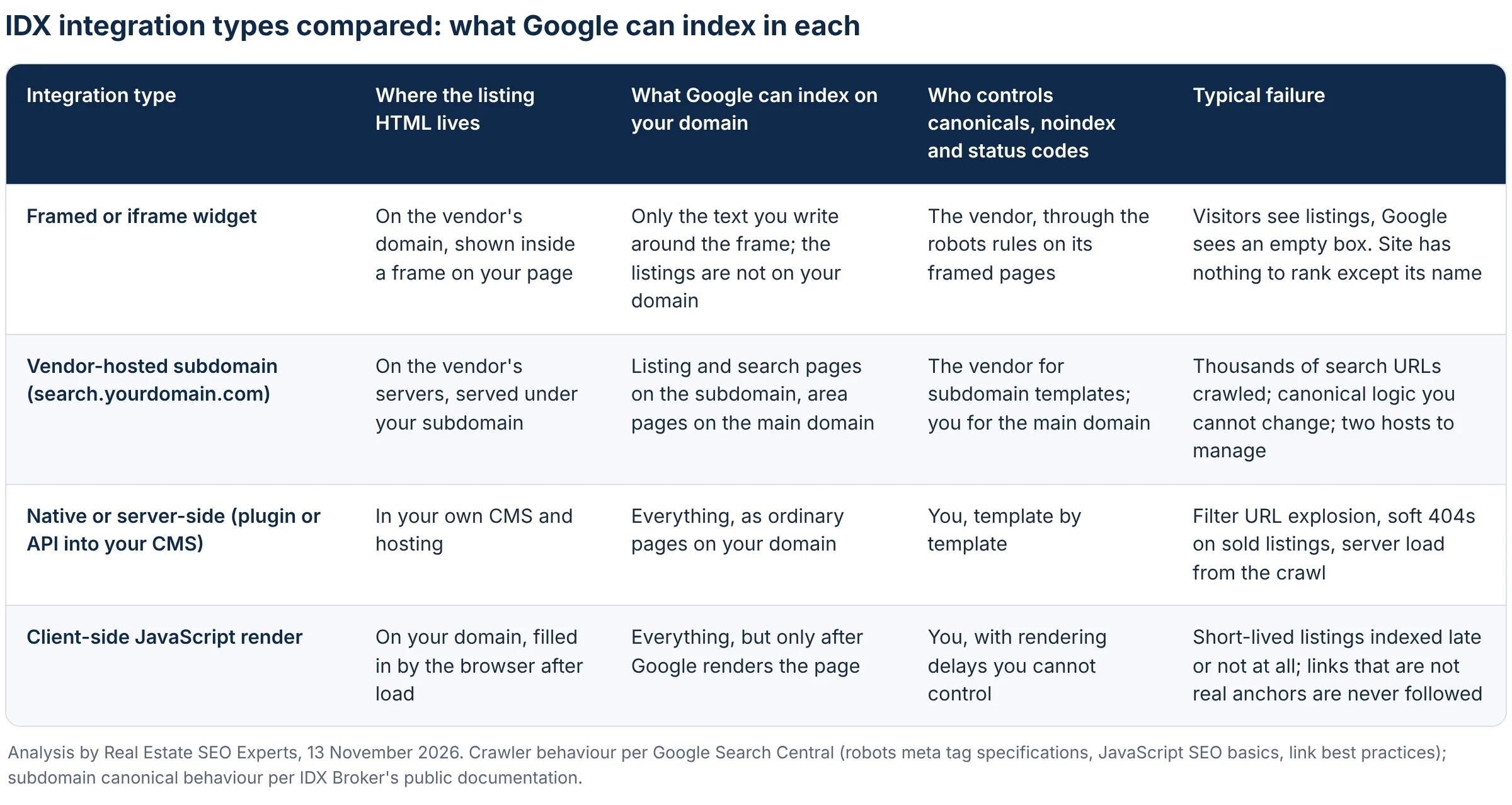
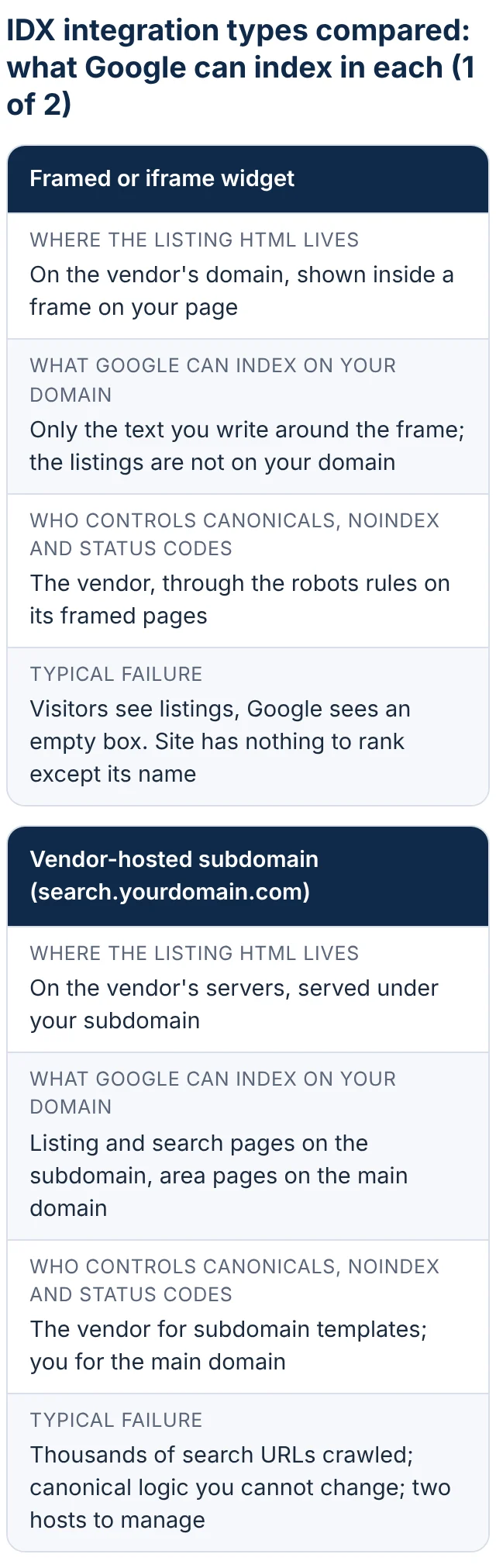
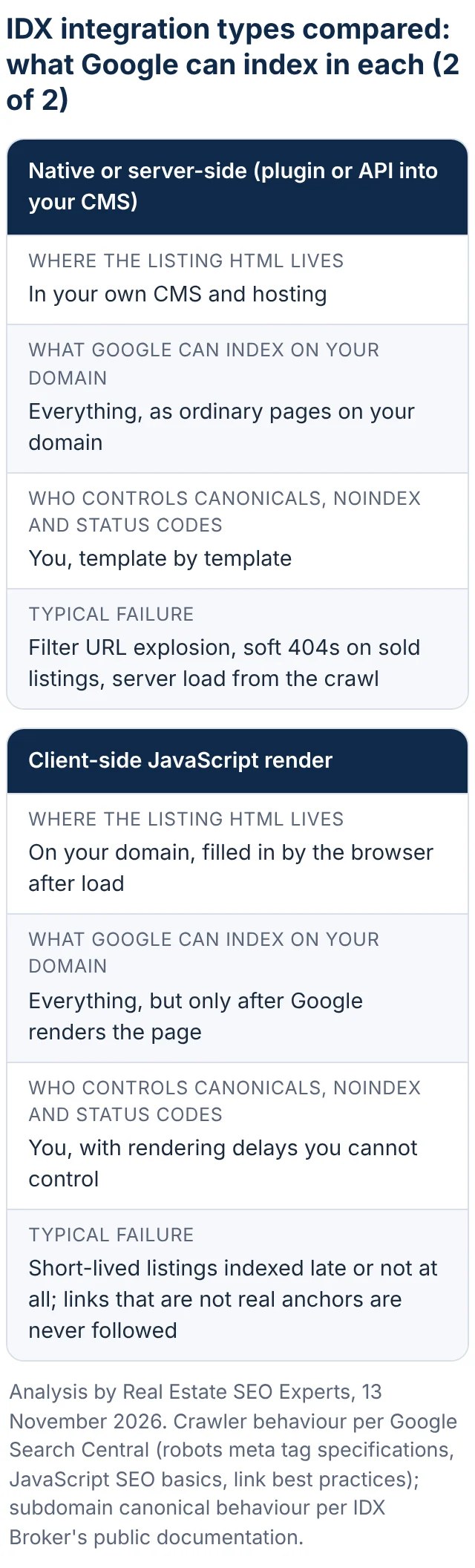
Our view: if you are choosing a platform, pick native server-side or a vendor subdomain whose canonical and status-code behaviour you have read in its documentation, and treat a framed widget as a lead-capture tool for existing visitors, never as something that will bring search traffic. If you are stuck with a framed widget on a site you cannot rebuild this year, the fix is not to optimise it; it is to build area pages with real text around it, which is covered below.
Duplicate content: your listing pages are copies, and that is normal
The second architectural fact is that every listing page on your site exists, with the same photos, the same remarks and the same facts, on every other IDX site in your MLS and on the portals. AgentFire’s support documentation puts it plainly: “The same listing is on thousands of websites”, and “When Google finds the same content in many places, it picks one version to show in search and skips the rest”. That is an accurate description of what Google calls canonicalization, which its documentation defines as the process of selecting the representative (canonical) URL of a piece of content, so that “a canonical URL is the URL of a page that Google chose as the most representative from a set of duplicate pages”.
Two things follow from Google’s own documentation on this. First, it is not a penalty: the same page says “Some duplicate content on a site is normal and it’s not a violation of Google’s spam policies”. The widespread belief that IDX “gets you penalised for duplicate content” is wrong. Second, your copy almost never wins. Google chooses the representative version using signals that include “whether the page is served over HTTP or HTTPS, redirects, presence of the URL in a sitemap” and rel=”canonical” annotations, and when a thousand near-identical pages compete, the one on the largest, most linked site tends to be chosen. In Search Console this shows up as “Duplicate without user-selected canonical” or “Duplicate, Google chose different canonical than user” on your listing URLs, or, if your vendor self-canonicalizes to its subdomain, as “Alternate page with proper canonical tag”, which IDX Broker’s documentation describes as “normal and expected”.
The decision this leads to is simple and most agents resist it: stop measuring your SEO by whether listing detail pages rank. For listings you do not represent, let them be indexable (a self-referencing canonical, no noindex, a 404 when they go) and spend nothing more on them. For your own listings, where you can add photos, a written description and local detail the portals do not have, the listing SEO guide linked above tells you what to do. For everything else, the ranking has to come from pages only you have, which is where the rest of this article goes.
Filter and sort URLs: how one search page becomes 40,000 URLs
Open the search page on a native or subdomain IDX and watch the address bar as you tick boxes. Every price band, bedroom count, property type, sort order and page number becomes a parameter, and every combination is a URL Google can discover. The arithmetic is our illustration, not data from a study: 30 cities multiplied by 8 price bands by 5 bedroom options by 4 property types is 4,800 result pages before anyone sorts them; three sort orders make it 14,400, and pagination multiplies again. None of those pages contains anything the others do not.
Google published dedicated guidance on this in its faceted navigation documentation (updated 18 December 2025). It says the usual parameter-based implementation “can generate infinite URL spaces” that cause overcrawling, where crawlers “access a very large number of faceted navigation URLs before the crawlers’ processes determine the URLs are in fact useless”, and slower discovery crawls, because “if crawling is spent on useless URLs, the crawlers have less time to spend on new, useful URLs”. For a real estate site the second harm is the one that hurts: new listings and new area pages wait behind sort-by-price URLs.
Google’s recommended options, in its own order, are these. If you do not need the filtered URLs indexed, disallow them in robots.txt, because “Oftentimes there’s no good reason to allow crawling of filtered items, as it consumes server resources for no or negligible benefit”. The documented example is a set of rules such as:
user-agent: Googlebot
disallow: /*?*price=
disallow: /*?*beds=
disallow: /*?*sort=
Alternatively, put filters in URL fragments (the part after #), which Google “generally doesn’t support” in crawling and indexing, so they have “no impact on crawling (positive or negative)”. Google also says rel=”canonical” and rel=”nofollow” can signal a preference but are “generally less effective in the long term” than those two methods. Three smaller rules from the same page are worth passing to your developer or vendor: use the standard “&” separator between parameters, keep the order of path-encoded filters fixed so /homes/austin/condos and /homes/condos/austin cannot both exist, and “Return an HTTP 404 status code when a filter combination doesn’t return results” rather than redirecting to a generic not-found page.
One warning that trips up many IDX setups: do not try to solve crawl waste with noindex. Google’s crawl budget documentation says “Don’t use noindex, as Google will still request, but then drop the page”, wasting the crawl. Noindex is the right tool for a page you want crawled but not shown; robots.txt is the tool for URLs you do not want fetched at all. Google frames crawl budget as a concern for sites with a million or more pages, or ten thousand pages that change daily, and says those numbers are rough, but it also names a third group: sites with “a large portion of their total URLs classified by Search Console as Discovered – currently not indexed”. A 3,000-listing IDX site with uncontrolled filters often fits that description.
Canonical tags, robots rules and noindex: one tool per URL type
The three controls get confused with each other constantly, and the confusion is expensive, so here are the rules as Google documents them, then a decision table.
A canonical tag is a strong signal, not a command. Google lists redirects and rel=”canonical” annotations as strong canonicalization signals and sitemap inclusion as a weak one, notes that they “can stack”, and chooses the canonical itself. A robots.txt disallow stops crawling, not indexing: Google says robots.txt “is not a mechanism for keeping a web page out of Google” and that a disallowed URL “can still appear in search results, but the search result won’t have a description”. Google also says explicitly, “Don’t use the robots.txt file for canonicalization purposes.” A noindex rule removes a page from results, but only if Google can fetch it: “For the noindex rule to be effective, the page or resource must not be blocked by a robots.txt file.” The most common self-inflicted wound we see on IDX sites is exactly that combination, a noindex on the search results template plus a robots.txt rule blocking the same path, which guarantees Google never reads the noindex.
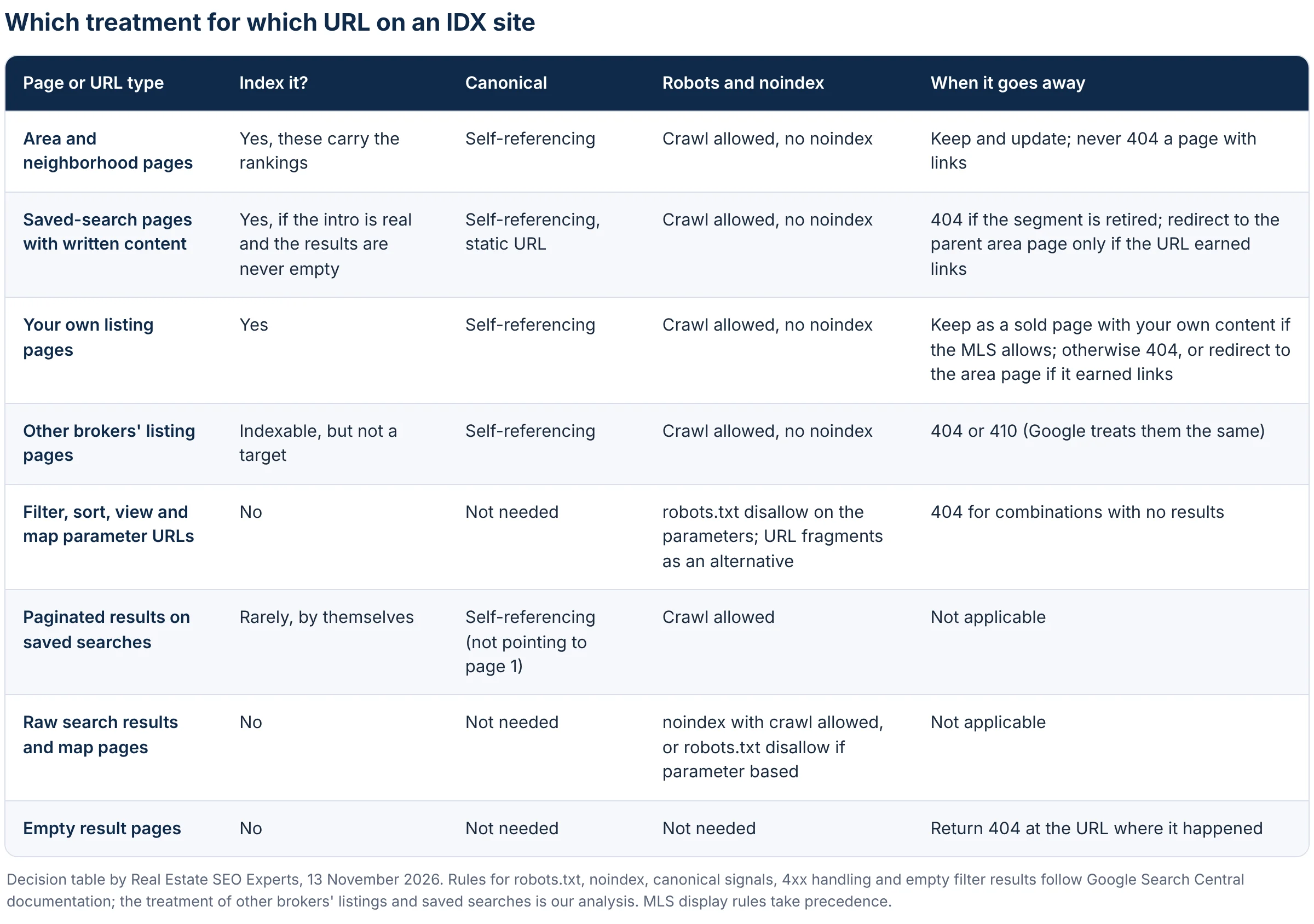
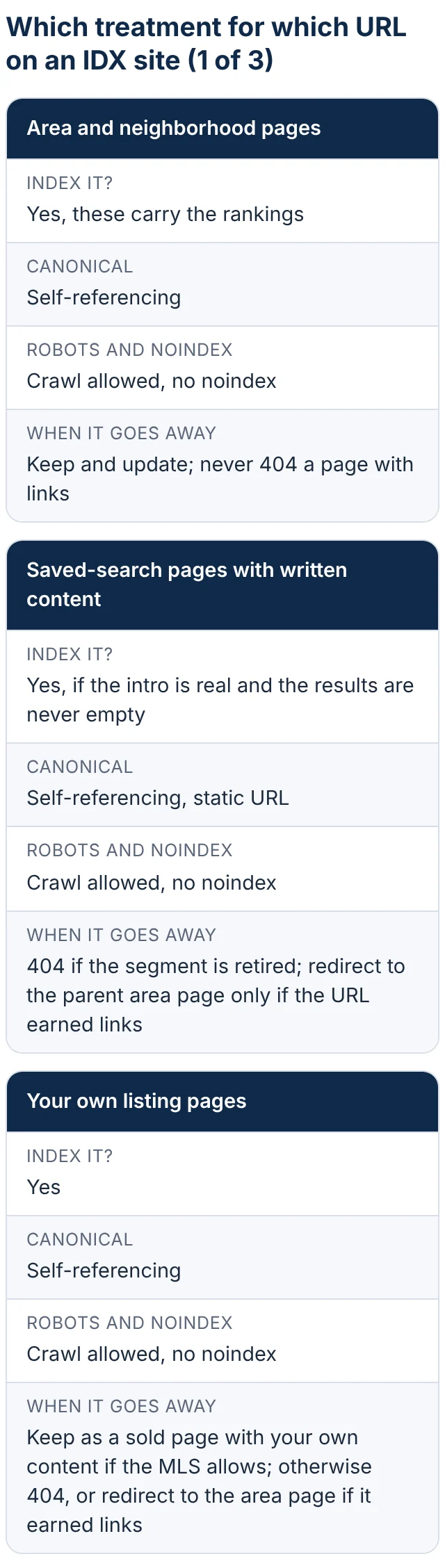
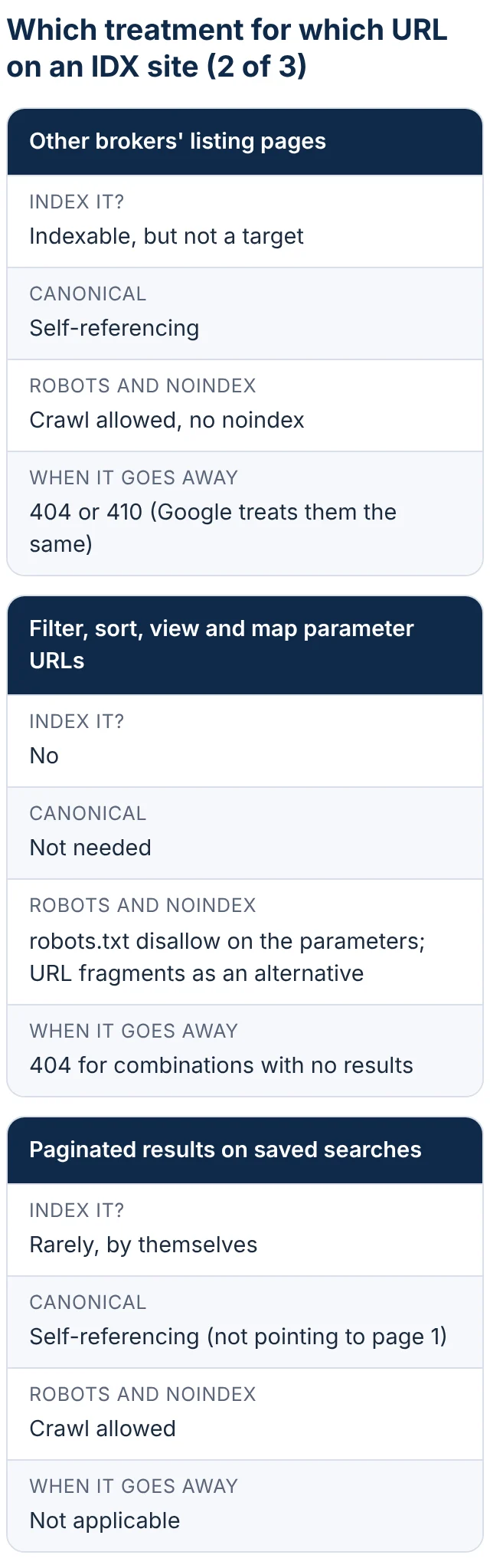
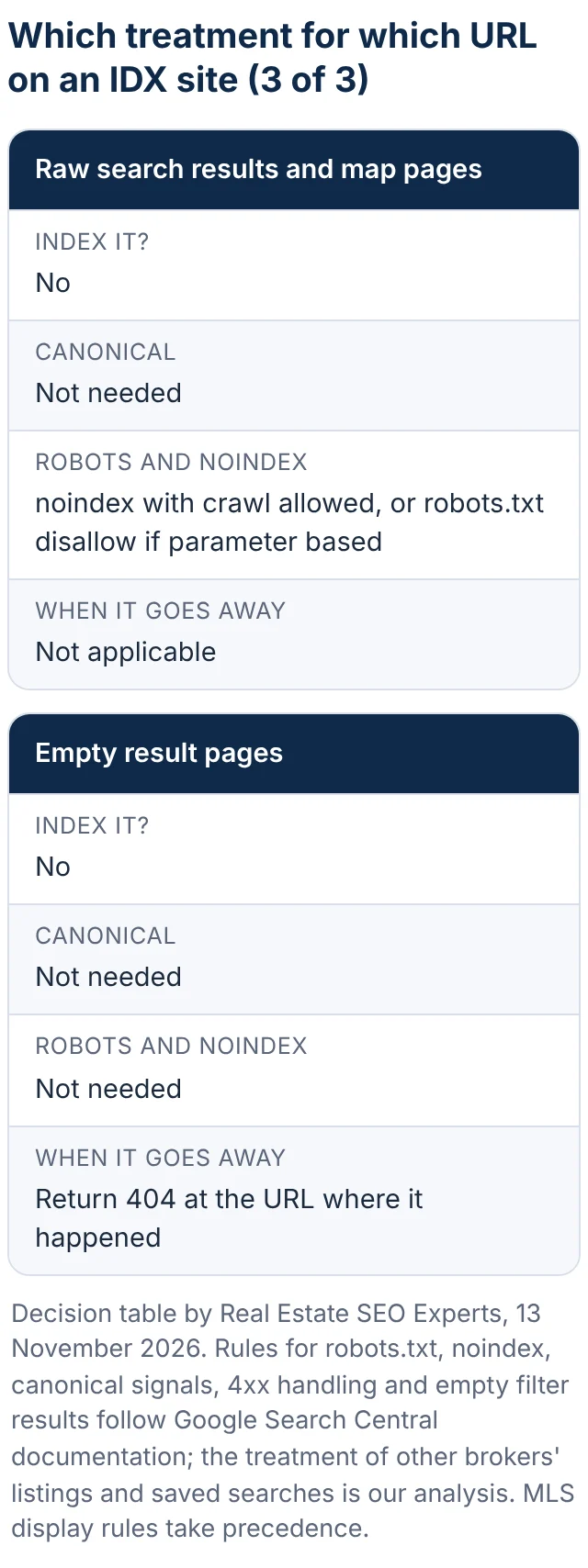
Two notes on the table. The treatment of other brokers’ listing pages is our judgement rather than a Google rule; an argument can be made for noindexing them on very large native integrations where they crowd out everything else, but doing so still costs a crawl per page, and most sites are better served by letting them stand and starving the filter URLs instead. And every rule in the table assumes your MLS display rules allow it; the MLS, not Google, decides whether you may show a sold price or keep a sold listing page live.
Sold, expired and off-market listings: 404, 410 or redirect
Listings leave the market every day, and a 3,000-listing site turns over a large share of its pages every month. What the page does the moment a listing goes is one of the clearest tells of a well-built IDX site.
Return a 404 or a 410 when the listing is gone and there is no replacement. Google’s documentation on HTTP status codes says “All 4xx errors, except 429, are treated the same”, that for Search “the indexing pipeline removes the URL from the index if it was previously indexed”, and that a 404 “is a strong signal not to crawl that URL again”. Despite the folklore, Google’s documentation gives no faster removal for 410 than for 404; use 410 if your platform supports it and you like the semantics (“gone” rather than “not found”), but do not expect it to change the result. What matters is that the response is a real 4xx, not a page that says “This listing is no longer available” with a 200 status. Google calls that a soft 404: a 2xx response whose content “suggests an error for Google Search, an empty page or an error message”, and its crawl budget guidance says soft 404 pages “will continue to be crawled, and waste your budget”. AgentFire’s documentation tells its customers that sold and delisted listings returning 404s are expected and that “You don’t need to redirect them or fix them”, which matches Google’s guidance.
Redirect only when there is a genuine replacement. Google treats a 301 as “a strong signal that the redirect target should be processed” and a 302 as a weak one, and its redirects documentation says permanent redirects “Show the new redirect target in search results”. A permanent redirect from a sold listing to your home page or to a generic search page is therefore telling Google that your home page is the new version of a three-bedroom in a specific neighborhood, which is false, and across thousands of listings it buries your real pages under a pile of redirect noise. Our rule: redirect a removed listing only when it is your own listing, the URL has earned external links or still gets traffic, and there is a page that serves the same intent, usually the neighborhood page that listing sat in. Everything else gets a 404.
Keep the page live, with a 200, only when it has become a different and useful page. If the MLS permits it and the listing was yours, a sold page with your photos, the sold date and a short note on the result is real content and can stay; the listing SEO guide’s section on what to do when a listing sells covers how to write it. A pending listing is still active for Google’s purposes and should stay indexable until it closes.
Speed: what the map and listing widgets cost
Core Web Vitals are three measurements Google takes from real Chrome users: Largest Contentful Paint, which “should occur within 2.5 seconds” of the page starting to load; Interaction to Next Paint, which should be “200 milliseconds or less”; and Cumulative Layout Shift, which should be 0.1 or less, each assessed at the 75th percentile of page loads, per web.dev. Google’s Search documentation says “We highly recommend site owners achieve good Core Web Vitals for success with Search” and that good page experience “aligns with what our core ranking systems seek to reward”. It does not say speed outranks relevance, and in our experience it does not; a fast page with nothing on it still loses. But IDX templates are where real estate sites fail these thresholds, for reasons that are specific to them.
The map is the usual culprit for LCP and INP. A map widget loads a third-party script, tiles, markers and often a second script for clustering before the page is interactive, and on a search results page it is frequently the largest element on screen. The listing grid causes CLS when photos load without declared dimensions and when the grid is injected after the rest of the page has rendered, so the footer jumps. Filter controls that re-render the whole grid on every change produce slow interactions. Fixes, in the order we apply them: load the map only when the visitor asks for it or scrolls to it (a static placeholder image above the fold, the live map on interaction); set explicit width and height on every listing photo and lazy-load those below the fold; cap the number of listings rendered before pagination; move any scripts that are not needed for the first paint out of the critical path; and measure the IDX templates themselves in PageSpeed Insights, because the home page passing tells you nothing about the search page. If the vendor controls the template, send them the field data for their URL pattern and ask what they will change. Mobile is where this gets judged: 70% of buyers used a mobile or tablet device during their search according to NAR’s 2026 report, one of the figures collected in our real estate SEO statistics roundup.
Which pages on an IDX site can actually rank
This is the part most agents have backwards. The pages that bring search traffic on an IDX site are rarely the listing detail pages and never the raw search results. AgentFire’s documentation gives its own customers the right answer: focus on “Pages only you have, like area pages, blog posts and market updates written about your area”. Here is how we rank the page types, from most to least likely to earn organic traffic, as an analysis of what we see rather than a published study.
Area and neighborhood pages with a listing module. A page about a neighborhood that explains the housing stock, prices, schools, commute and the trade-offs a buyer actually weighs, with a live module showing the current listings in that boundary, is a page only you can produce and the one most searches of the form “homes for sale in [area]” or “[neighborhood] real estate” are looking for. The listings on it are shared; the 600 words around them are not. Our local SEO guide for real estate agents covers the Business Profile and citation side of winning those same searches.
Saved-search pages with real content. A saved search is a filter combination that you have promoted to a permanent page with a clean URL: condos under $400,000 in a named district, waterfront homes in a county, new construction in a school zone. It earns indexing when it has a distinct title, a written introduction that answers who buys this and why, internal links from the relevant area pages, and enough results that the page is never empty. A saved search is a parameter URL that has been given a reason to exist. Our threshold, which is a judgement rather than a rule: if you cannot write 250 words about the segment that a buyer would want to read, it should stay a filter and be blocked.
Market report and data pages, updated on a schedule with a dated URL or a dated section, for “[city] housing market” searches. Your own listings, optimised as the listing SEO guide describes. Blog posts answering the questions buyers and sellers in your market ask. And then, a long way down, other brokers’ listing pages, which may rank for the exact address when the bigger sites do not, and raw search result or map pages, which should not be in the index at all.
Diagnose it in Search Console: the checklist
You can run all of this yourself in an hour with Search Console access. If you want it done for you, our free real estate SEO audit runs these checks and writes up the findings.
1. Open the Pages report under Indexing and compare the indexed count to the number of pages you actually want indexed (area pages, saved searches, your listings, posts). A count far above it means filter URLs or other brokers’ listings dominate; far below means something is blocking. Note that Google caps the example lists at 1,000 rows, so on a large IDX site you are seeing a sample.
2. Read the “Why pages aren’t indexed” reasons with IDX eyes. “Duplicate without user-selected canonical” and “Duplicate, Google chose different canonical than user” on listing URLs mean your copies lost, as expected. “Alternate page with proper canonical tag” means your vendor’s canonicals are working. “Discovered – currently not indexed” in volume is the filter-URL problem described above. “Crawled – currently not indexed” on area pages means the pages exist but Google judged them not worth indexing, which is a content problem. “Soft 404” on listing URLs means sold listings are returning 200. A robots.txt block and a noindex exclusion reported on the same path is the self-cancelling combination.
3. Use URL Inspection on five URLs: the home page, one area page, one active listing, one filter URL and one listing you know has sold. For each, check that crawling and indexing are allowed, read the “Google-selected canonical”, and open “View crawled page” to confirm the listing content is actually in the HTML Google saw. A framed IDX fails this last step on every listing.
4. Open Settings, then Crawl stats. Look at the response-code breakdown (a large 404 share is normal on an IDX site; a large 5xx or 429 share is not, and Google says those “prompt Google’s crawlers to temporarily slow down with crawling”) and at the by-URL breakdown to see whether the crawl is going to search parameters.
5. In the Performance report, filter pages by the path your area pages live on, then by the path your listings live on, and compare clicks. On a healthy IDX site the area and saved-search pages carry the traffic.
6. In the Core Web Vitals report, look at which URL groups fail on mobile. If the failing group is your search or listing template, the fixes in the speed section apply.
7. Finally, run a site: search in Google for your IDX subdomain or listing path and look at what is indexed. Thousands of sort and price URLs in the results is confirmation of the crawl problem; nothing at all on a site that has been live for months is confirmation of the framing problem.
The fix list, in priority order
This is the order we work in, because each step either protects the next or makes it measurable.
1. Make sure Google can read listing content at all. If the IDX is framed and ranking matters to you, plan the move to a native or subdomain integration whose documentation describes its canonical and status-code behaviour. Until then, build area pages with written content on your main domain so the site has something to rank.
2. Stop the crawl bleed. Add robots.txt disallow rules for every filter, sort and view parameter the search tool generates, following Google’s faceted navigation guidance; make empty result combinations return 404; find and fix the soft 404s on sold listings so they return a real 404 or 410.
3. Fix removals. Confirm what the platform does the moment a listing changes status, remove any blanket redirect to the home page, and reserve redirects for your own listings with links or traffic.
4. Settle the canonicals. One host for the listing pages, a self-referencing canonical on every indexable listing and area page, consistent parameter order and separators, and no canonical pointing at a page with different content.
5. Build the pages that can rank: area and neighborhood pages with a listing module, then saved-search pages with a written introduction, each with a distinct title and a static URL, linked from the main navigation and from each other.
6. Speed the templates, not the home page: deferred map, dimensioned and lazy-loaded photos, fewer scripts before first paint, re-measured in PageSpeed Insights on the search and listing URL patterns.
7. Rebuild the XML sitemap so it lists only indexable, canonical URLs (area pages, saved searches, your listings, posts) and is kept current; Google reads sitemaps regularly and limits each file to 50,000 URLs or 50 MB, so a native integration with thousands of listings needs a sitemap index.
8. Add structured data to listing and area pages where it describes what is on the page; our schema article on 23 November goes into which types are worth the effort now that Google has retired several rich result types.
9. Measure monthly: indexed count against the target list, the Pages report reasons, Core Web Vitals by template, and clicks by page type. The month a plugin update adds noindex to every listing page, this is what catches it.
Steps 1 to 4 are a developer’s or vendor’s week of work on most sites; steps 5 and 6 are the ongoing programme, and they are the substance of our real estate website SEO service, which starts by running this diagnosis on your site and writing up what is broken, in this order, before quoting anything. Our real estate SEO checklist has the shorter version of this list alongside everything else a site needs, and if you want a sense of how long the recovery takes once the architecture is fixed, our article on how long real estate SEO takes sets out the timeline for a site that starts with technical debt.
Frequently asked questions
Does an IDX website hurt SEO?
Not by itself. Google’s documentation says duplicate content on a site is normal and not a spam violation, so showing shared MLS listings does not get a site penalised. What hurts is the architecture around the feed: a framed integration that leaves nothing on your domain to index, uncontrolled filter URLs that absorb the crawl, sold listings returning soft 404s, and slow search templates. A well-configured IDX on a site with real area pages is neutral to positive; a badly configured one is the main reason the site does not rank.
Should IDX listing pages be set to noindex?
Usually not. Google’s crawl budget documentation says noindex does not save crawling, because Google still requests the page before dropping it, and a self-canonicalizing, indexable listing page costs you nothing when it is not chosen as the canonical. Noindex is appropriate for pages you want crawled but not shown, such as a search results template with a user-specific view. For filter and sort URLs the right tool is a robots.txt disallow, and for removed listings it is a 404 or 410.
Is a subdomain IDX bad for SEO?
A vendor-hosted subdomain is a workable architecture, not a defect. Its pages are real HTML that Google can crawl, and vendors such as IDX Broker document that listing pages carry a self-referencing canonical on the subdomain. The limitations are control and ownership: you cannot change the vendor’s canonical or status-code logic, and the listing pages sit on a different host from your area pages. The ranking still has to come from the pages on your main domain, which is true of every integration type.
Should I 301 redirect sold listings?
Only when the listing was yours, the URL has earned links or traffic, and there is a page that serves the same intent, usually the neighborhood page. Google treats a permanent redirect as a strong signal that the target is the new version of the page, so redirecting thousands of sold listings to the home page sends a false signal at scale. For the ordinary case, a shared listing that has left the market, a 404 or 410 is correct, and Google’s documentation treats the two the same.
Can Google index content inside an iframe on my site?
Sometimes, but you do not control it. Google’s robots rules include an indexifembedded rule that lets the owner of the framed page allow its content to be indexed when it is embedded elsewhere despite a noindex, which shows that the decision sits with the owner of the framed page, in this case your IDX vendor, and Google makes no promise to merge framed content into the page around it. In practice, listings shown through an iframe from a vendor’s domain are not content on your domain, and your pages have nothing to rank with beyond the text you write around the frame.
How many pages should an IDX site have indexed?
As many as you have pages worth showing, and no more: your area and neighborhood pages, your saved-search pages with real content, your own listings, your market reports and posts, plus the shared listing pages that happen to be indexable. If Search Console shows tens of thousands of indexed URLs on a site with 30 area pages, filter and sort URLs are being indexed and should be blocked; if it shows a few dozen on a site with thousands of listings, check whether the IDX is framed or blocked.
Sources: Google Search Central, Managing crawling of faceted navigation URLs (updated 18 December 2025), Google Search Central, What is URL canonicalization (updated 20 August 2026), Google Search Central, How to specify a canonical URL (updated 10 July 2026), Google Search Central, Introduction to robots.txt (updated 10 December 2025), Google Search Central, Block Search indexing with noindex (updated 10 December 2025), Google Search Central, Robots meta tag specifications (updated 24 March 2026), Google Search Central, Crawl budget management (updated 22 July 2026), Google Search Central, How HTTP status codes affect Google’s crawlers (updated 4 February 2026), Google Search Central, Redirects and Google Search (updated 14 April 2026), Google Search Central, Understand JavaScript SEO basics (updated 4 March 2026), Google Search Central, SEO link best practices (updated 10 December 2025), Google Search Central, Build and submit a sitemap (updated 8 July 2026), Google Search Central, Understanding Core Web Vitals and Google search results (updated 10 December 2025), web.dev, Web Vitals (updated 31 October 2024), Google Search Console Help, Page indexing report, IDX Broker, How canonical URLs and indexing work for IDX pages, iHOUSEweb, iHOUSE IDX integration and search engines (modified 10 April 2015), AgentFire, Why Google doesn’t index most IDX listing pages, iHomefinder, IDX integration for websites (30 August 2019). All pages fetched and checked on 13 November 2026.
Is the IDX setup the reason your site does not rank?
Our real estate website SEO service starts with exactly this diagnosis: integration type, what is indexed, filter URLs, status codes on sold listings and speed on the search templates, written up in priority order before we quote anything. Plans start from $150 a month.